

AI Backtesting: How to Backtest a Trading Strategy With AI (and Not Fool Yourself)
AI backtesting explained: the two ways AI backtests a trading strategy, the failure modes that fake good results, and a step-by-step method you can trust.
By Hristo Skulev · Updated · 10 min read
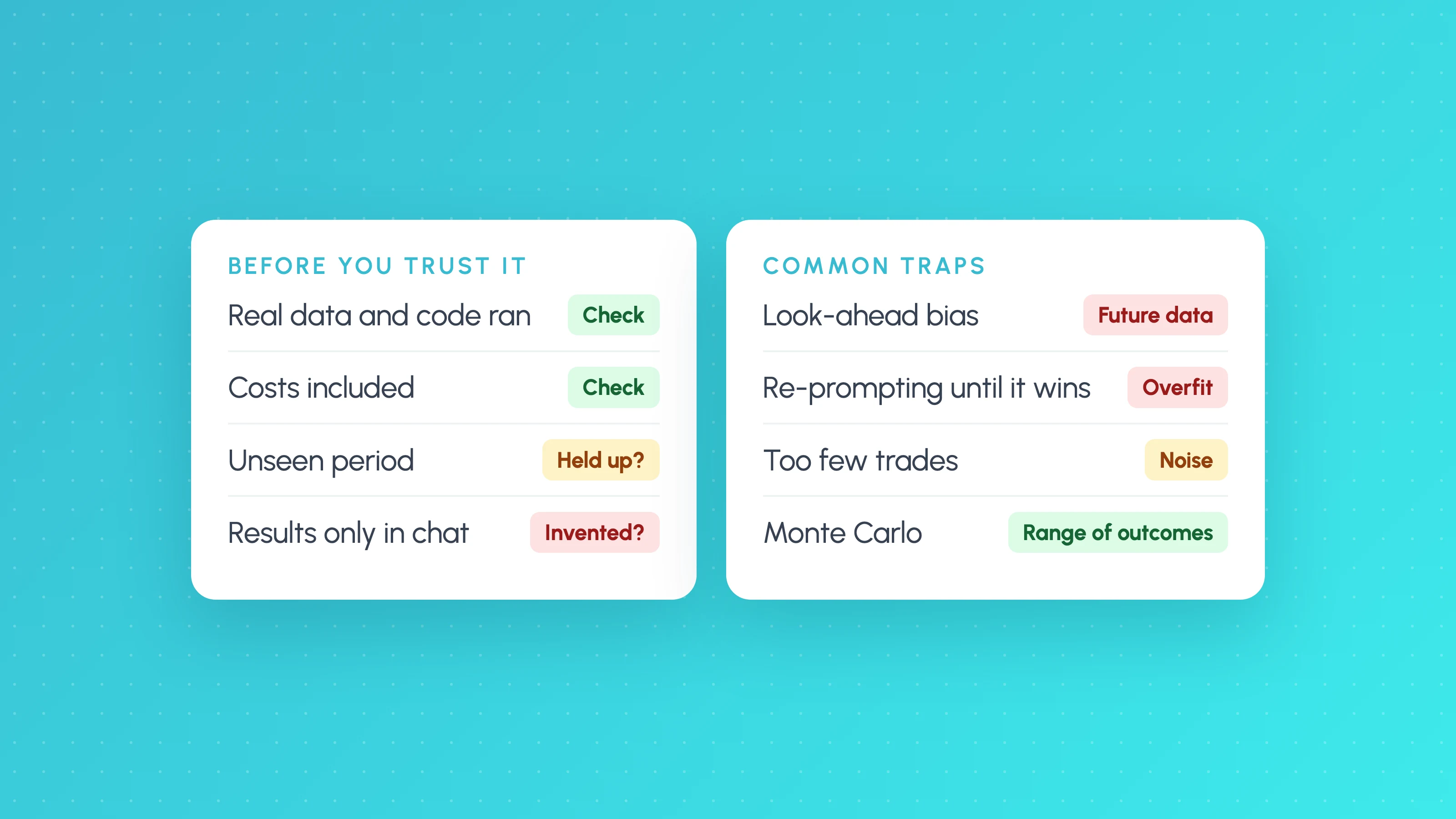
AI backtesting means using AI to turn a trading idea into exact rules and then running those rules on real historical prices, with costs, to see how they would have traded. The AI can help with the idea, the rules and the code, but the result only counts if real code ran on real price data. A win rate an AI chatbot writes in a reply without running anything is a guess, not a backtest.
In practice there are two kinds of AI backtesting. In the first, a general assistant such as ChatGPT or Claude writes Pine Script or Python that you run somewhere else. In the second, an AI tool builds the strategy and runs the backtest itself, on its own data and cost model. Both can work. Both can also fool you, mostly through invented numbers, look-ahead bias, missing costs and prompting your way into an overfit strategy.
Backtests and paper results are not future results. Leveraged forex, CFDs and crypto are high risk. The strategy, its settings and the risk you take are yours.
What "AI backtesting" means in practice
| Route | What the AI does | Where the backtest runs | Main thing to check |
|---|---|---|---|
| Chat reply only | Describes a strategy and quotes results | Nowhere | The numbers were never calculated |
| AI writes code | Writes Pine Script or Python | On a platform or your own computer, on data you supply | The code matches your rules and has no look-ahead |
| AI runs code on your file | Runs Python on a price file you upload | In the assistant's sandbox | The data, the costs and the code it ran |
| AI backtesting tool | Builds the rules and runs the test | On the tool's own engine and data | The rules it read back match what you meant |
Avoid the first row. The other three can all produce a real backtest, and the checking is the same whichever you use.
If you started with a ChatGPT idea, ChatGPT trading strategy backtest has a prompt template that gets exact rules out of it. If an assistant has already written code for you, how to test a strategy ChatGPT or Claude wrote walks through the code review. If you use Claude Code or Codex with TradingView, can Claude or Codex backtest with TradingView covers that setup.
The four failure modes, and how to check each
1. The AI invents the results
Ask a chatbot "how did this strategy do over five years?" and it may answer with a win rate, a profit factor and a drawdown. Unless it ran code on prices, those figures are text that looks like an answer.
There is one partial exception. OpenAI's help page says ChatGPT can write and run Python in a notebook environment on files you provide, but that the environment "cannot make external web requests or API calls" (OpenAI: data analysis with ChatGPT, checked 27 November 2026). So the calculation can be real, but only on the file you uploaded.
How to check: ask where the data came from and to see the code that produced each number. If there is no data and no code, discard the numbers.
2. Look-ahead bias
The strategy uses information it could not have had at the time. Common versions in AI-written code: deciding an entry with a candle's close and filling at that same candle's open, reading a higher-timeframe value before that candle has closed, and indicators calculated on the whole data set before the loop starts.
How to check: ask the AI to state, for each rule, exactly which candle's data it uses and when the order is filled. Entries should be decided on a closed candle and filled on the next one.
3. Wrong or missing costs
Most generated backtests ignore spread, commission, slippage and swap unless you ask. On short timeframes the spread can be a large share of each trade's target, so a strategy can be profitable at zero cost and losing after it. A related problem is a candle that touches both the stop and the target: the code must decide which came first, and the honest assumption is the stop.
How to check: set costs from your own broker before you look at any result, then double them. See slippage in algo trading for why fills are worse than the chart suggests.
4. Overfitting by iterating prompts
This is the failure mode that is new with AI. Each "make it better" prompt is another test on the same history, and after twenty rounds the best version has been tuned to past noise. The equity curve improves every time, which is exactly why it is dangerous.
How to check: count the versions you tried, keep a period the AI never saw, and test the final version on it once. If results collapse there, or when an input moves by 10 to 20 percent, the strategy fitted the history. Is my backtest overfit? lists the signs.
How to backtest a trading strategy with AI properly
This method works with any tool. Each step removes one way of fooling yourself.
- Write exact rules. Every rule needs a number: indicator settings, entry checked on candle close, stop, target, session with its time zone, maximum trades per day and risk per trade. Ask the AI to list every assumption it made, then decide each one yourself.
- Read the rules back. Have the AI or tool restate the strategy in plain English before it runs. If the read-back differs from what you meant, fix it now. A good result on the wrong rules is worthless.
- Choose the data and costs before you look at results. Pick the market, timeframe and history length, and set spread, commission, slippage and swap to realistic values.
- Run the backtest once. Look at net result after costs, profit factor, maximum drawdown and the number of trades, not just win rate.
- Test the unseen period. Decide a cut-off before you start tuning. Build only on data before it, then run the final version once on the period after. See out-of-sample testing.
- Run Monte Carlo. Reshuffling the trade order shows the range of drawdowns the same trades could have produced. Plan for the bad end of that range, not the single historical line. Monte Carlo backtesting explains how to read it, and the free Monte Carlo simulator runs it on any trade list.
- Check the sample size. As a rough guide, look for at least 100 trades overall and 30 in any slice you act on. How many trades a backtest needs explains why.
- Try other markets. Run the same rules, unchanged, on similar markets. An edge that exists on one pair in one year and nowhere else is probably luck.
- Paper trade it. Run it forward on live prices with no money at risk and compare the trades with what the backtest would have taken. See how long to paper trade a strategy.
Steps 5, 6 and 8, plus price noise and higher costs, are the core of a stress test. How to stress test a trading strategy covers all six tests with pass and fail rules of thumb.
AI backtesting tools: a neutral overview
These are the main routes as of 27 November 2026. Check each tool's own page before you rely on any detail, because AI products change quickly.
ChatGPT, Claude and other assistants writing Pine Script or Python. Free or cheap, flexible, and good at turning an idea into code. They have no price data or backtest engine of their own in a normal chat, so the backtest runs wherever you run the code, and every check above is your job.
TradingView's MCP server. TradingView offers an official MCP server, in beta, that lets assistants such as Claude connect to a TradingView account. Its documentation lists tools for price bars (at most 5,000 rows per call), Pine scripts and a run_pine_backtest tool that returns "a compact Strategy Tester report", and says equity curves are never returned. Each call counts toward a daily allowance that depends on your TradingView plan (TradingView MCP docs, checked 27 November 2026).
LuxAlgo Quant. LuxAlgo describes Quant as a coding agent inside its Vela charts that writes strategies in Pine Script and backtests them in the same window, including a check against prop-firm challenge rules. Its page says Quant is on the Free plan with usage that refills, and that order execution is limited to paper accounts with your approval (LuxAlgo Quant, checked 27 November 2026).
TradeZella backtesting. TradeZella's help centre describes two modes: manual backtesting, where you replay historical charts candle by candle and place trades yourself, and automated backtesting, where you define rules and its engine runs them on historical data (TradeZella: what is backtesting, checked 27 November 2026). It is a journal-first product rather than an AI strategy builder.
For a fuller comparison, see the best AI trading strategy builders and the best no-code backtesting software.
How Tessera does AI backtesting
In Tessera's Strategy Lab, you describe a strategy in plain English to TES, the AI strategy coach, or build it from setups, filters and exits. TES turns the description into exact rules and proposes each change for you to confirm, so nothing about the strategy changes without you seeing it. Strategy Lab reads the rules back in plain English before the backtest runs.
The backtest is real: it runs the rules on 1-minute to daily candles, with spread, commission, slippage and swap included. Then the stress tests run on the same strategy:
| Test | What it catches |
|---|---|
| Unseen period | Rules that only fit the history they were built on |
| Monte Carlo | A drawdown that was lucky in its trade order |
| Price noise | An edge that depends on exact prices |
| Higher costs | A strategy that only works at near-zero spread |
| Other markets | A result confined to one market |
| Prop-firm rules | Whether the drawdown would break a challenge's limits |
Strategy Lab tests forex, spot gold and silver, US stocks, US ETFs (including the index ETFs QQQ, SPY, DIA and IWM) and crypto against USDT. It does not test futures or index CFDs; ask TES about a NAS100 idea and it offers QQQ instead.
On the Free plan, with no card, you get 15 backtests a week and 5 TES prompts a week, on every timeframe from 1-minute to daily. History depends on the timeframe: 30 days on 1-minute, 90 days on 5-minute, a year on 15-minute, two years on 30-minute to 8-hour and five years on daily. Paid plans go further back. The weekly TES limit also works as a brake on prompt overfitting: settle the rules, then test.
If you would rather start from something already tested, the strategy library has around 130 backtested strategies with full rules, every trade and the TES prompt to rebuild each one, including forex, gold and crypto collections.
Then a paper run in Launchpad
A strategy that holds up goes to Launchpad, which runs it with the same code as the backtest. The Free plan includes one 7-day paper run with no trade limit: live prices, the backtest's own costs and no broker connection. That is the forward check in step 9. Live trading, Copilot (you approve each signal) and Autopilot are on paid plans, on venues including Binance, Hyperliquid, cTrader and Liquid Brokers.
Frequently asked questions
- What is AI backtesting?
- Using AI to turn a trading idea into exact rules and test those rules on historical prices. It is only a real backtest if code ran on real data with costs. Results an AI chatbot writes without running code are not calculated.
- How do I backtest a trading strategy using AI?
- Write exact rules, have the AI read them back, set data and costs before looking at results, run the backtest, then test it on an unseen period, with Monte Carlo, with enough trades and on other markets. Paper trade it before using real money.
- Is there a free AI backtesting tool?
- Several tools have free tiers. Tessera's Free plan includes 15 backtests and 5 TES prompts a week on 1-minute to daily candles, with no card. LuxAlgo's page says Quant is on its Free plan with refilling usage. ChatGPT and Claude can write strategy code for free, but you run the backtest elsewhere.
- Can ChatGPT backtest a trading strategy?
- Not from a chat reply alone. It can run Python on a price file you upload, according to OpenAI, but its code environment cannot fetch data from the web. Check the code, the data and the costs it used. See ChatGPT trading strategy backtest.
- How many trades does an AI backtest need?
- The same as any backtest: as a rough guide at least 100 trades overall and 30 in any slice you act on. AI does not change the statistics.
Backtested strategies that held up
Each one was searched from hundreds of variants, then tested once on a locked final year it was never tuned on. Full rules, every trade and a free prompt to rebuild it.
- ETHUSDT
+1,893.2%
Sep 2019 to Nov 2026
Profit factor
1.39
Win rate
35.2%
Max DD
−18.9%
Breakout · 4 hours
ETHUSDT 4h Bollinger band breakout
Enter when the candle closes above the upper Bollinger band(30, 2) for longs, below the lower band for shorts, with the 200 EMA trend. ETHUSDT 4-hour candles, long and short, 3R target.
See the rules and results - EURUSD
+1,339.5%
Nov 2006 to Nov 2026
Profit factor
1.66
Win rate
53.0%
Max DD
−16.0%
Momentum · Daily
EURUSD daily CCI cross
Enter when CCI(14) crosses above -100 for longs, below 100 for shorts. EURUSD daily candles, long and short, 1.5R target.
See the rules and results - ADAUSDT
+937.9%
Sep 2019 to Nov 2026
Profit factor
1.50
Win rate
34.5%
Max DD
−15.0%
Breakout · 4 hours
ADAUSDT 4h Bollinger band breakout
Enter when the candle closes above the upper Bollinger band(20, 2) for longs, below the lower band for shorts, with the 200 EMA trend. ADAUSDT 4-hour candles, long and short, 3R target.
See the rules and results
Keep reading
ChatGPT Trading Strategy Backtest: How to Test an AI Idea Properly
A ChatGPT trading strategy backtest is only real if the rules run on actual price data. How to turn a ChatGPT idea into exact rules, prompt it and test it.
 AI and Pine Script
How to Test a Trading Strategy ChatGPT or Claude Wrote
A step-by-step way to check an AI-written Pine Script strategy: catch lookahead and repainting, set realistic costs, test out of sample and by market condition.
 AI and Pine Script
Best AI Trading Strategy Builders (2026): Which Ones Turn Plain English Into a Tested Strategy
Which AI trading strategy builders turn a plain-English idea into a backtested strategy? We compare TrendSpider Sidekick, LuxAlgo Quant, TradingView Copilot, Composer, Tessera and more.