Tessera

Looking for an TraderSync Alternative?Rule Testing on Your Real Fills

TraderSync brings Cypher AI, mobile apps and 700 plus brokers. Tessera ends every review with a report, a simulation, a policy or Pine you can forward test.

The best TraderSync alternative depends on what you want from a review. If you want an AI coach, mobile logging and the widest broker list, stay with TraderSync. If you want every session to end in a rule you can test and export to TradingView, Tessera is built for it, from $19 a month.

TraderSync is a data heavy journal with broad coverage: 700 plus brokers and exchanges, iOS and Android apps, market replay, and Cypher AI for conversational analysis of your history. Tessera is a performance lab on your closed trades. You get the journal stack you expect, plus computed reports, a counterfactual simulator, Trade Review to chart your fills, and policies you can push to TradingView as Pine. If a broker is missing from the native list, Custom CSV lets you map once and reuse the template.

Quick answer: TraderSync vs Tessera

TraderSyncTessera
Best atCypher AI, mobile logging, 700 plus brokers, granular replayReports, simulator, policy, TradingView Pine on closed trades
Journal and statsDeep analytics, flexible notes and tagsFull journal stack (log, notes, statistics, charts)
AICypher answers questions in chat, capped by daily message limitsTES writes a narrative from prepared report statistics
What you leave withAn answer in a chat threadA report, a simulation result, a policy or a Pine script
Entry price$29.95 a month (Pro)$19 a month (Standard)
Free trial7 days, all plans, no cardNone on self serve access
MobileNative iOS and AndroidWeb app
Choose whenYou want a coach and apps on the goYou want each finding to end in something testable

In plain English: Cypher answers questions about your history in chat. Tessera shows you the numbers on trades you already took, then lets you test a rule change, one at a time, and walk away with a report, a simulation, a policy or Pine.

TraderSync pricing and features below are indicative as of September 2026, taken from public product and pricing pages. Confirm on TraderSync's site before you buy.

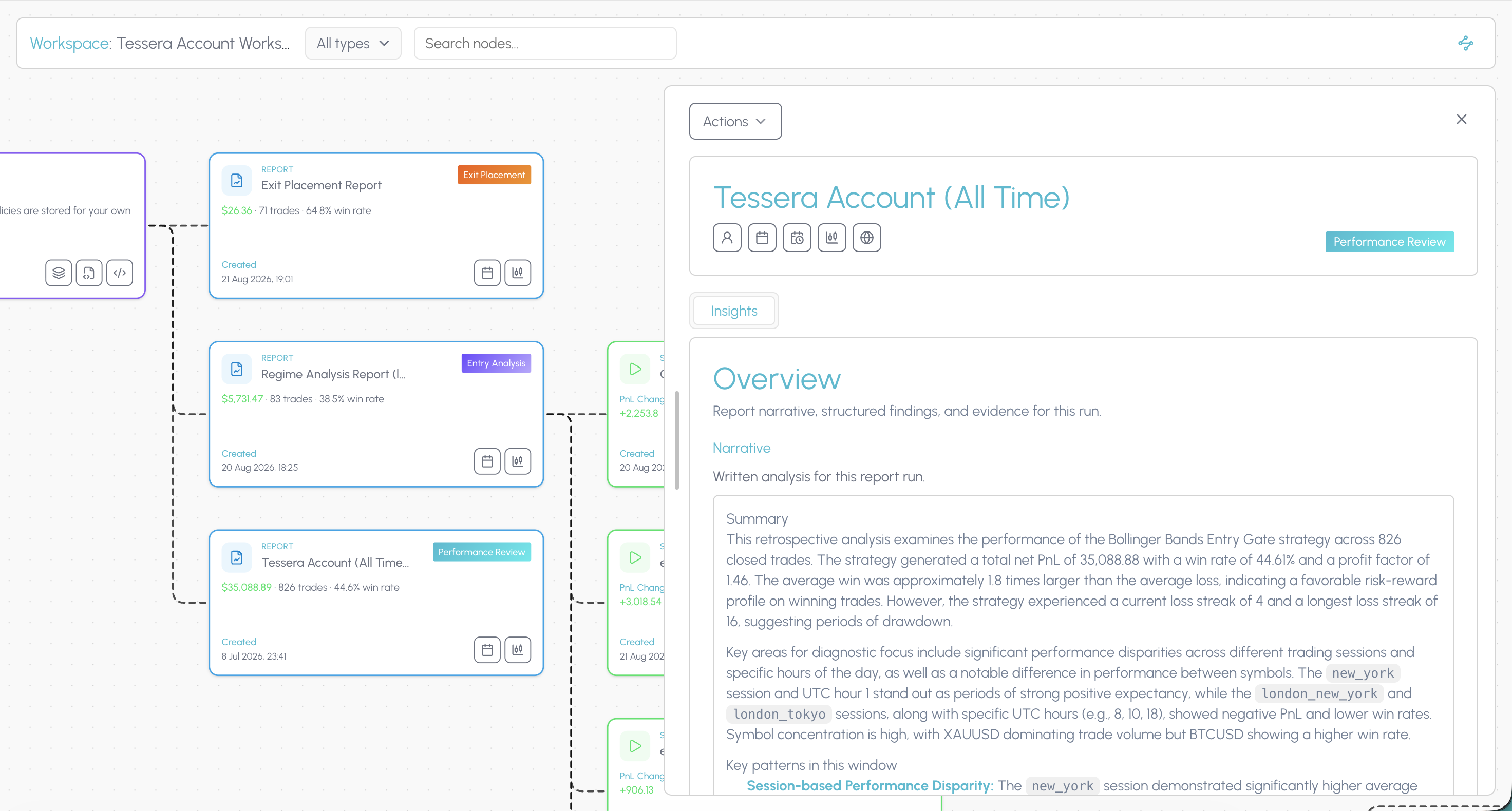
Tessera Entry Analysis report showing higher timeframe alignment across the London and New York overlap

What TraderSync does well

TraderSync's strengths are breadth and AI. Broker and exchange coverage runs past 700 platforms, which is the widest published list in the category and the single strongest reason to choose it. Native iOS and Android apps make capture easy away from the desk. Market replay lets you reload a past session and step through it, with playback fidelity improving by plan, from one minute steps on Pro through one second on Premium to 250 millisecond updates with Level II depth and time and sales on Elite. Cypher answers questions about your trading history in chat, with proactive Coach behaviour on Elite.

A seven day free trial across all plans, with no card required, makes it easy to evaluate before you commit. If coaching chat, tape reading and mobile capture are how you improve, that is a fair reason to choose them.

Why traders look for a TraderSync alternative

The common triggers:

The good parts sit above the entry plan. Pro at $29.95 a month is the working journal. Cypher is capped at roughly five messages a day there, replay is coarse, and the Evaluator and Simulator arrive on Premium at $49.95. Elite is $79.95.

AI you cannot use freely. Daily message caps mean the assistant is metered rather than available.

Chat answers do not carry forward. Cypher can tell you a session is weak. It does not hand you a tested rule.

You want to test a rule on trades you already took, one change at a time, rather than place hypothetical trades on historical charts.

You write TradingView Pine and want a bridge from live fills back into script rules.

Sales are final after the trial. There is no post purchase refund window, so the seven days is the whole evaluation period.

The workspace is dense. Imports, reports, tags, AI and replay in one screen suits power users and can feel crowded if you mainly want to review today's trades.

The connected workspace

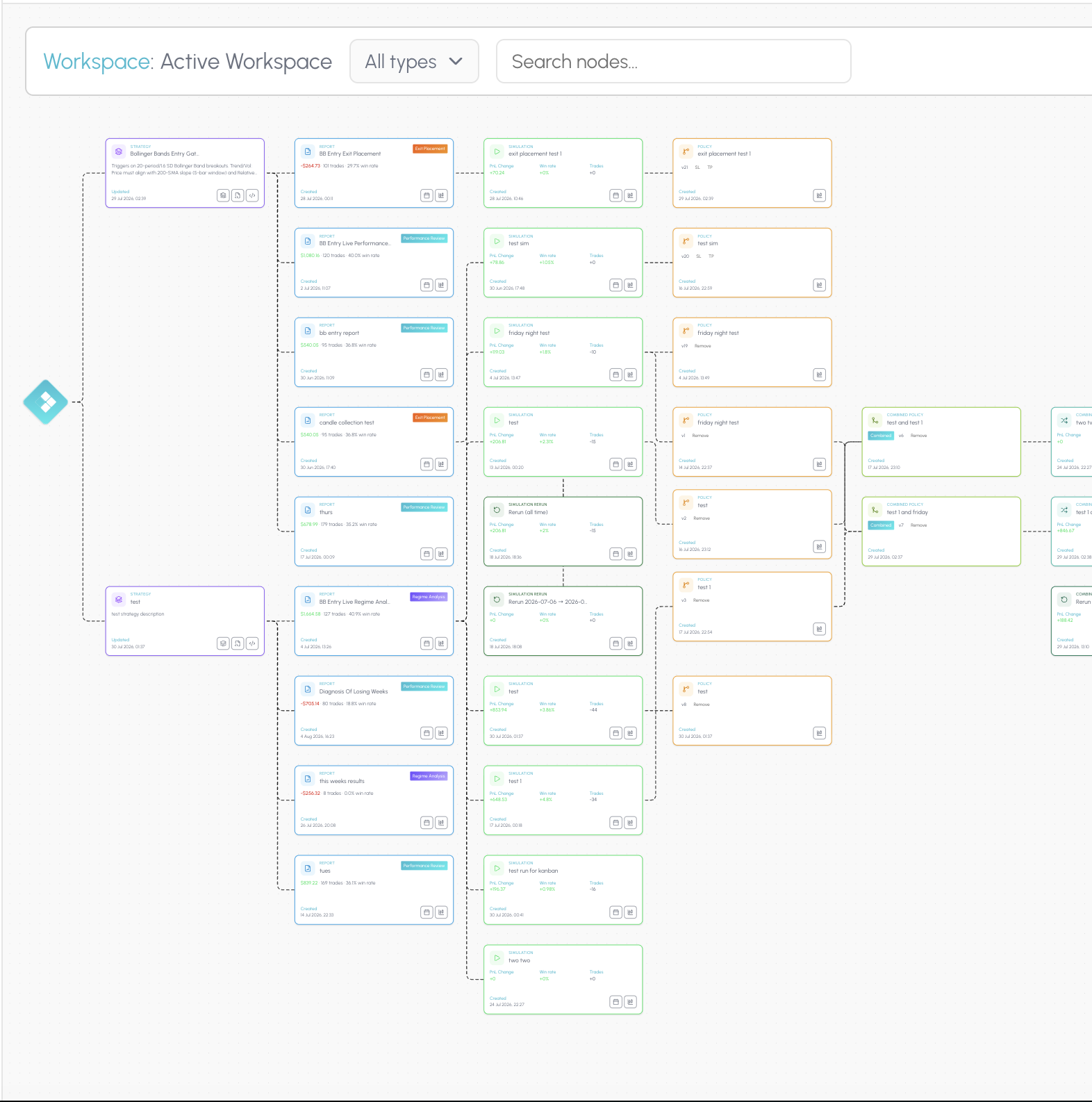
TraderSync packs imports, reports, tags, AI and replay into one dense screen, but the lineage between them is easy to lose. Tessera's connected workspace is built for a full overview: your trade data, the reports you ran on it, the simulations that tested a change, and the policies that came out the other side.

The hub shows every strategy, report, simulation and policy you have built, without hopping between pages for each artefact type. Open a workspace canvas and those pieces become a node graph linked by what produced what. Cypher can tell you a session was weak. The workspace shows which report surfaced it, which simulation tested the fix, and which policy you kept.

That is how you see whether a rule actually held up after you changed it, not just whether the chat felt convincing. Explore the workspace.

TraderSync Simulator vs the Tessera simulator

Both products use the word simulator, and they mean different things. This is the distinction that matters most on this page.

TraderSync's Simulator and Evaluator (Premium and above) let you place hypothetical trades on historical charts. You scroll back through past price action and practise, or you test a setup idea on trades that never happened. It is a training and idea generation tool, close in spirit to replay.

Tessera's simulator applies a rule change to the trades you actually took. Same fills, same history, one variable moved. Add an entry filter, or shift stop loss and take profit distance, and see what that closed cohort would have returned. Nothing hypothetical is invented. The output is a comparison against your real result, which you can then save as a policy and compose into Pine.

If you want to practise a setup you have never traded, TraderSync is the right tool. If you want to know whether a filter would have saved your worst month, Tessera is.

TraderSync SimulatorTessera simulator
InputHistorical price chartsYour closed trades
Trades testedHypothetical, placed by youReal, already executed
Question answeredWould this setup work?What would this rule have done to my results?
OutputPractice recordCohort comparison, saveable as a policy and exported as Pine

Test one entry filter on your own trades

Run a free Entry Analysis report, then simulate dropping one group of trades from the history you already took.

Journaling and statistics: parity first

A TraderSync alternative still has to journal and measure:

  • Journaling. Notes and setup screenshots on trades, plus notes on reports, simulations and policy executing accounts.
  • Statistics. PnL, win rate, expectancy, sessions, symbols, timing and risk on the same closed trade data that feeds the reports.
  • Imports. Native connectors where we support them, otherwise Custom CSV with a saved mapping template.
  • Trade Review. Chart your trades on their own. After a report pick or a simulation, see exactly which trades that policy covers.

Tessera does not claim wider broker coverage than TraderSync, and there is no native mobile app. It covers the journal foundation, then differentiates on computed reports, counterfactual simulation and Pine policies.

TraderSync vs Tessera: feature comparison

FeatureTraderSyncTessera
JournalingNotes, tags, screenshots, flexible structureTrade log notes and setup screenshots, notes on reports, simulations and executing accounts
Statistics and analyticsDeep analytics, Strategy Checker, extensive filtersStatistics, dashboard, Performance, Entry and Exit reports
Visual trade reviewMarket replay, fidelity by plan, Level II and time and sales on EliteTrade Review charts fills, and shows which trades a policy covers after a pick or simulation
Trade import700 plus brokers and exchanges, mobile captureNative broker paths plus Custom CSV, map once and reuse
AICypher AI question and answer, roughly 5 messages a day on Pro and 15 on Premium, Coach on EliteTES writes a scoped narrative on prepared report statistics, not metered by message
Idea testingSimulator and Evaluator on Premium and above, hypothetical trades on historical chartsSimulator applies entry filters and SL or TP distance to your closed cohort
TradingView and rules exportImport and analysis workflowsPolicy Pine merges into a strategy or exports as a standalone indicator
Connected workspaceDense single screen mixing imports, reports, tags, AI and replayConnected workspace: hub overview plus canvas linking strategies, reports, simulations and policies
MobileNative iOS and Android appsWeb app
Free trial7 days, no cardNone on self serve access

TraderSync alternative pricing compared

TraderSync (indicative, Sept 2026)Tessera
PlansPro $29.95, Premium $49.95, Elite $79.95 a monthStandard $19, Plus $39
Annual billingAvailable at a lower effective monthly rate, terms varySee pricing
What is includedCypher caps, replay fidelity, account limits and idea testing all vary by tierSame product features on both plans. Plus raises report and simulation caps
Free tierNoneNone
Free trial7 days on all plans, no cardNone on self serve access

Two differences worth naming plainly. TraderSync gates its idea testing and its useful AI limits behind the middle and top tiers, so the realistic comparison is Premium at $49.95 rather than Pro at $29.95. Tessera runs the same feature set on Standard and Plus, and the plans differ only in how many reports and simulations you can run.

The other difference runs the other way. TraderSync gives you a seven day trial and Tessera does not. What we offer instead is a free trade analysis report on your own history, so you can see the output on your trades before you pay anything.

How the Tessera workflow fits together

Tessera is a connected product suite on your closed trades: journal and statistics, focused reports, a simulator, policies, and Pine export, kept together on one workspace.

Trade Log

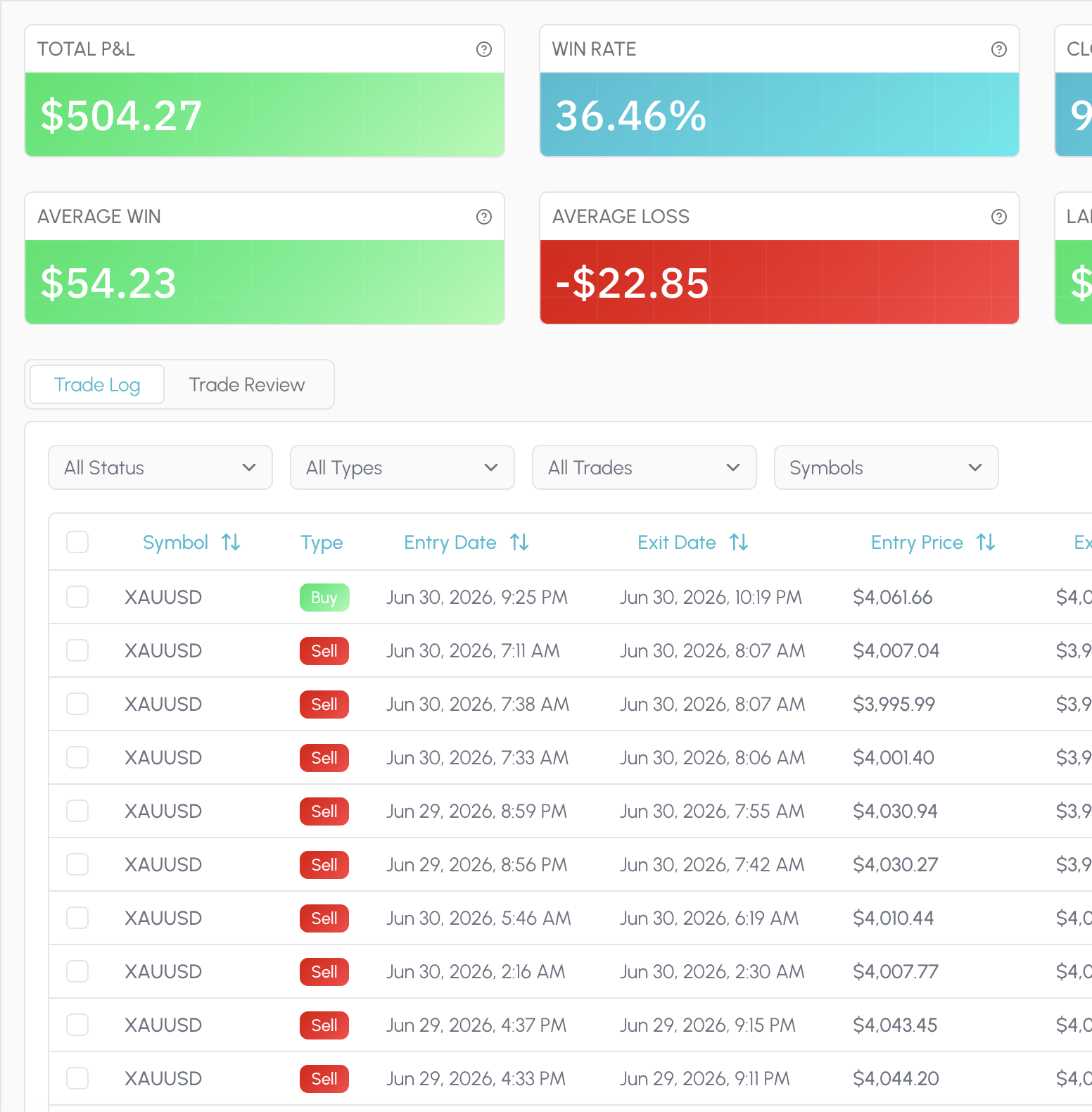
Every fill lives in one place: synced from a broker or imported once through Custom CSV with a mapping you can reuse. Attach a market snapshot and a short note when the trade still matters, not as a mood ritual, but as context for later review.

That same history feeds everything else in Tessera. Statistics, reports, simulations and policies all read the closed trades you already took, so you are not stitching exports together every Sunday.

  • Sync supported brokers in one click
  • Map a CSV once, reuse the template
  • Snapshot the chart state at the fill
  • Optional notes, no mood checklist
  • Same fills power every later view
  • Review without a Sunday spreadsheet merge
Tessera Trade Log with notes and setup context on closed trades

Statistics

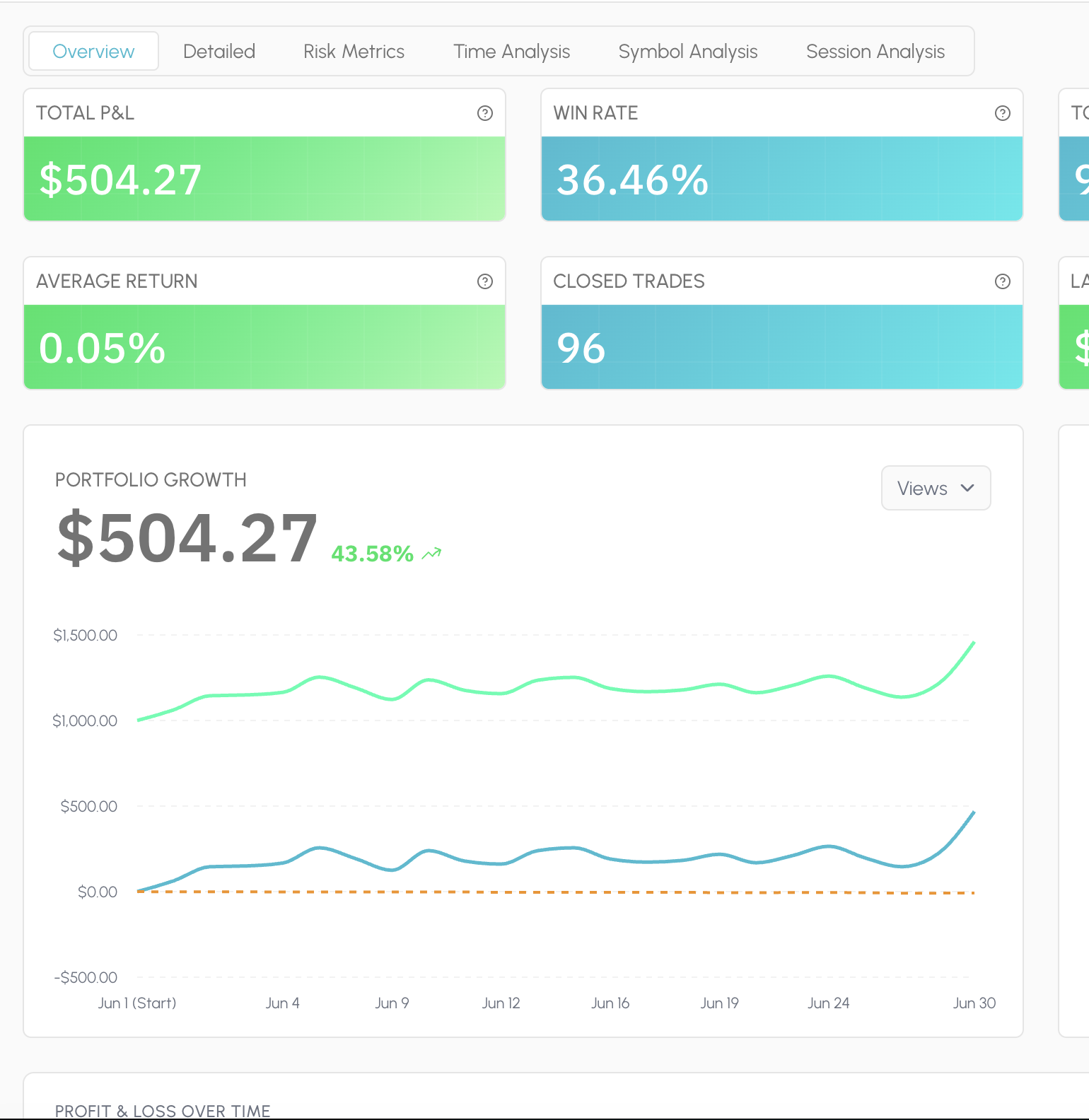
Statistics is the always-on read of your book: PnL, win rate, expectancy, drawdown, sessions, symbols, timing and risk, laid out so you can scan a period and move on. Filter the window and the charts follow the trades you selected.

There is no proprietary Tessera score and no composite grade that flattens your account into someone else's ideal profile. The dimensions stay checkable. When you need a deeper cut than the dashboard, you leave Statistics and run a focused report.

  • P&L, win rate, expectancy, drawdown
  • Cut by session, symbol, and timing
  • Filter a period; charts follow
  • Standard metrics you can audit
  • No proprietary composite score
  • Hand off to a report when you dig in
Tessera Statistics dashboard showing session and symbol metrics

Reports

Reports answer a specific question on the same closed history. Performance Review for how a strategy or period actually behaved. Entry Analysis for which conditions at entry separated winners from losers. Exit Placement for whether stops and targets were doing their job.

Condition slices surface the pattern in plain terms: session, trend, volatility, distance to a level, indicator state. You leave with a cohort you can name, not a vague sense that "New York was bad." That cohort is what you take into Trade Review and the simulator next.

  • Which entry conditions actually paid
  • Whether your stops earned their keep
  • Session, trend, and volatility slices
  • Distance-to-level cohorts you can name
  • A finding you can take into the sim
  • Built on fills you already took
Tessera Entry Analysis report with condition slices

Trade Review

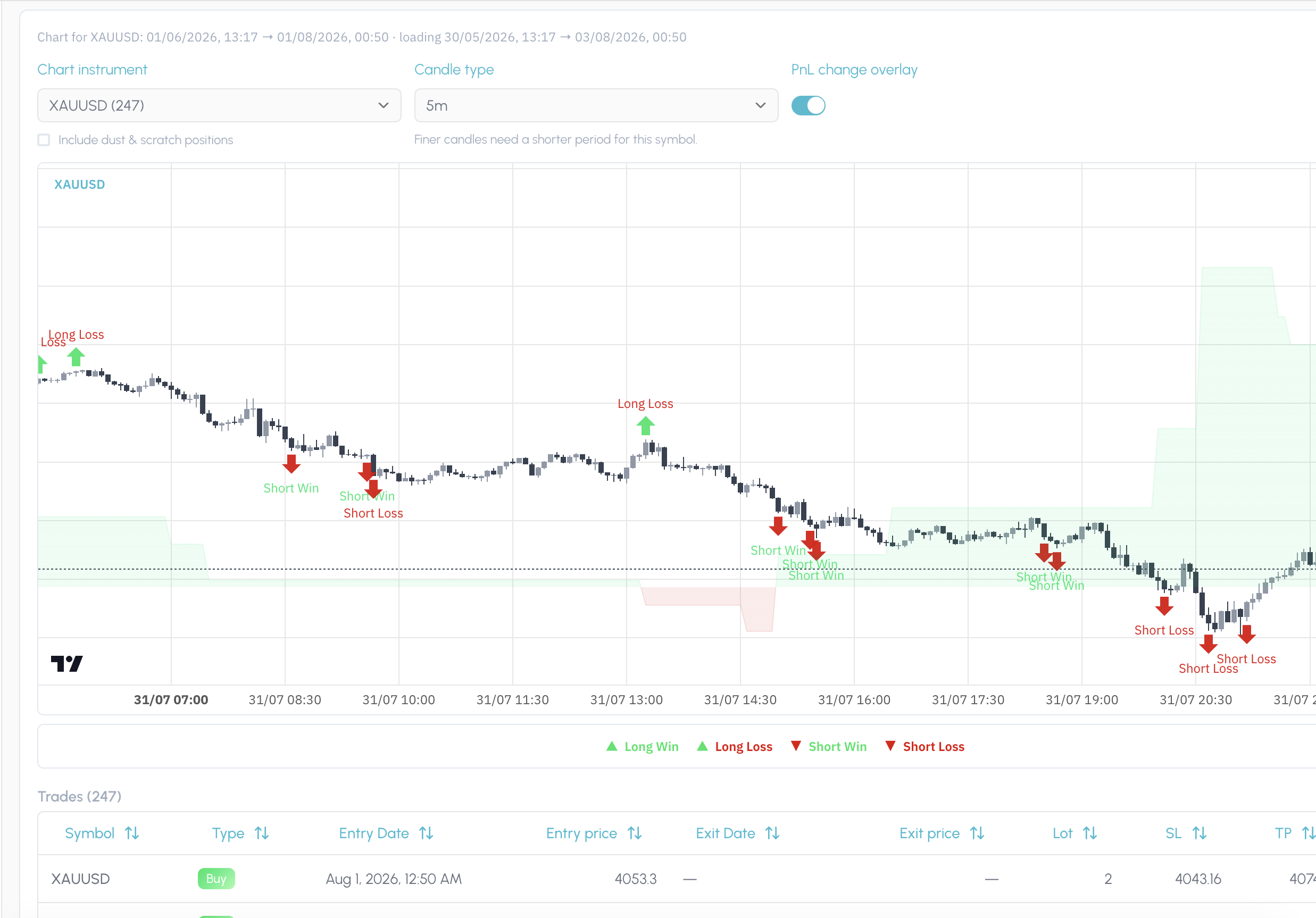
Trade Review puts your fills back on the chart in the price action and regime they happened in. After a report pick or a simulation, it also shows exactly which trades that finding or policy covers, so you are not guessing from a table of ticket IDs.

Use it to confirm the story before you change a rule. If the slice looks wrong on the chart, you catch it here. If it looks right, you have visual proof of the cohort you are about to test.

  • See each fill on the live candles
  • Regime and context at the entry
  • Highlight every trade in a report pick
  • Preview which fills a sim would touch
  • Catch a bad slice before you change rules
  • Visual proof before you save a policy
Tessera Trade Review charting the fills covered by a finding

Simulator

The simulator asks what would have happened if you had traded the same closed history under a different rule. Keep or drop entries by the conditions present when you took them: session, trend, volatility, indicator state. Or leave the entries alone and vary stop loss and take profit distance.

Run one change at a time so you can see what moved. Compare the filtered cohort against the original. If the result holds up, you are ready to save it as a policy rather than leaving the insight in a screenshot folder.

  • Drop entries by session or condition
  • Test wider or tighter SL / TP distance
  • Hold everything else fixed
  • Compare filtered vs original cohort
  • Counterfactuals on your real fills
  • Promote a result into a policy
Tessera simulator cohort comparison after an entry filter

Policies

A policy is a versioned rule attached to a strategy: the keep filter, the veto, the exit distance that survived a simulation. It is not a note in a journal and not a half-remembered habit from last month's review.

When something holds up, you save it, name it, and keep it on the strategy so you can return to it, combine it with other policies, and re-test the stack. The point is a rule you can defend, not a feeling that you should "be more selective in New York."

  • Keep filters and veto rules, versioned
  • Exit distance saved on the strategy
  • Name the rule so you can find it again
  • Stack policies and re-simulate together
  • Return to last month's tested change
  • A rule you can defend, not a feeling
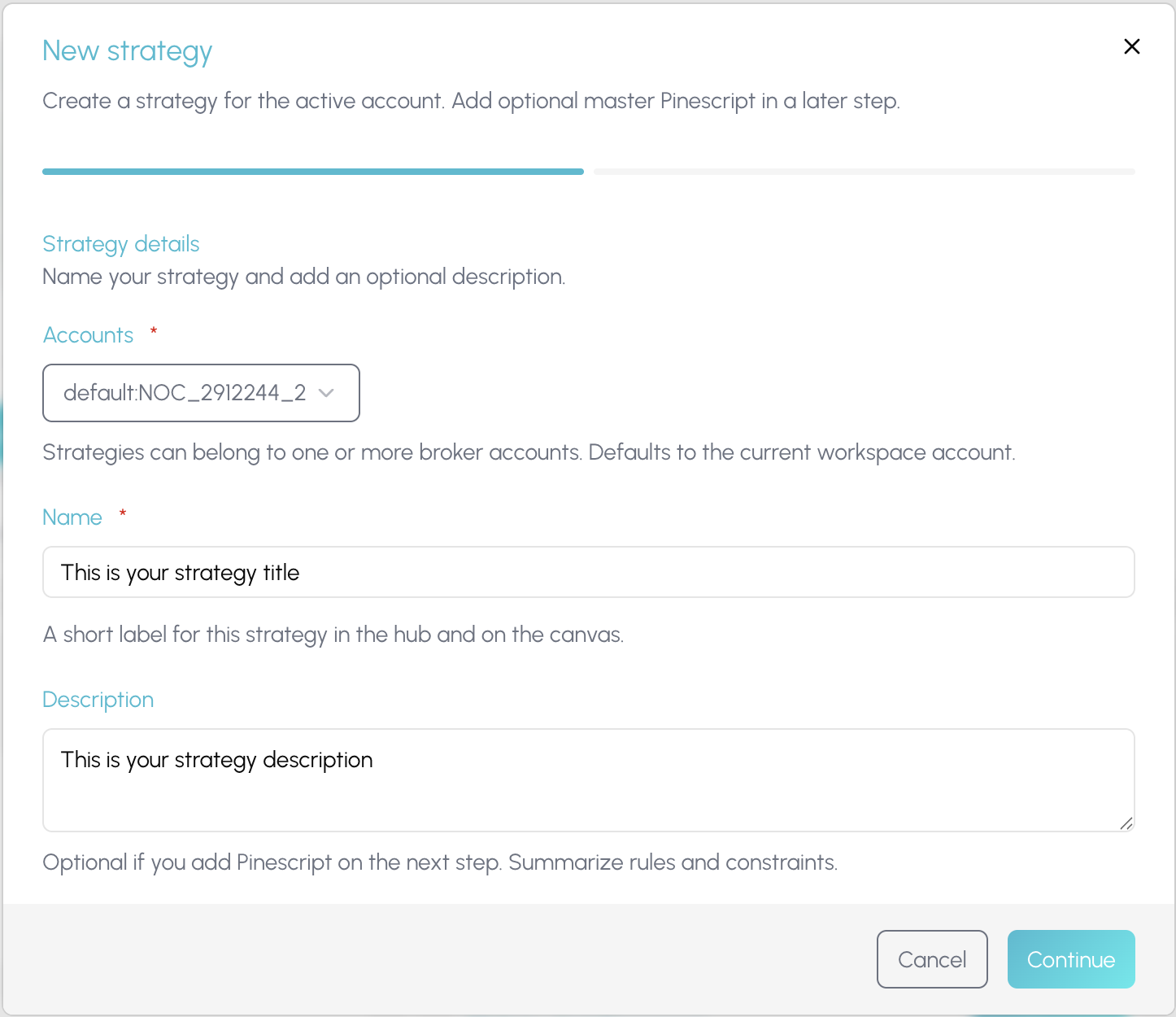
Creating a strategy and policy in Tessera

Policy Pine

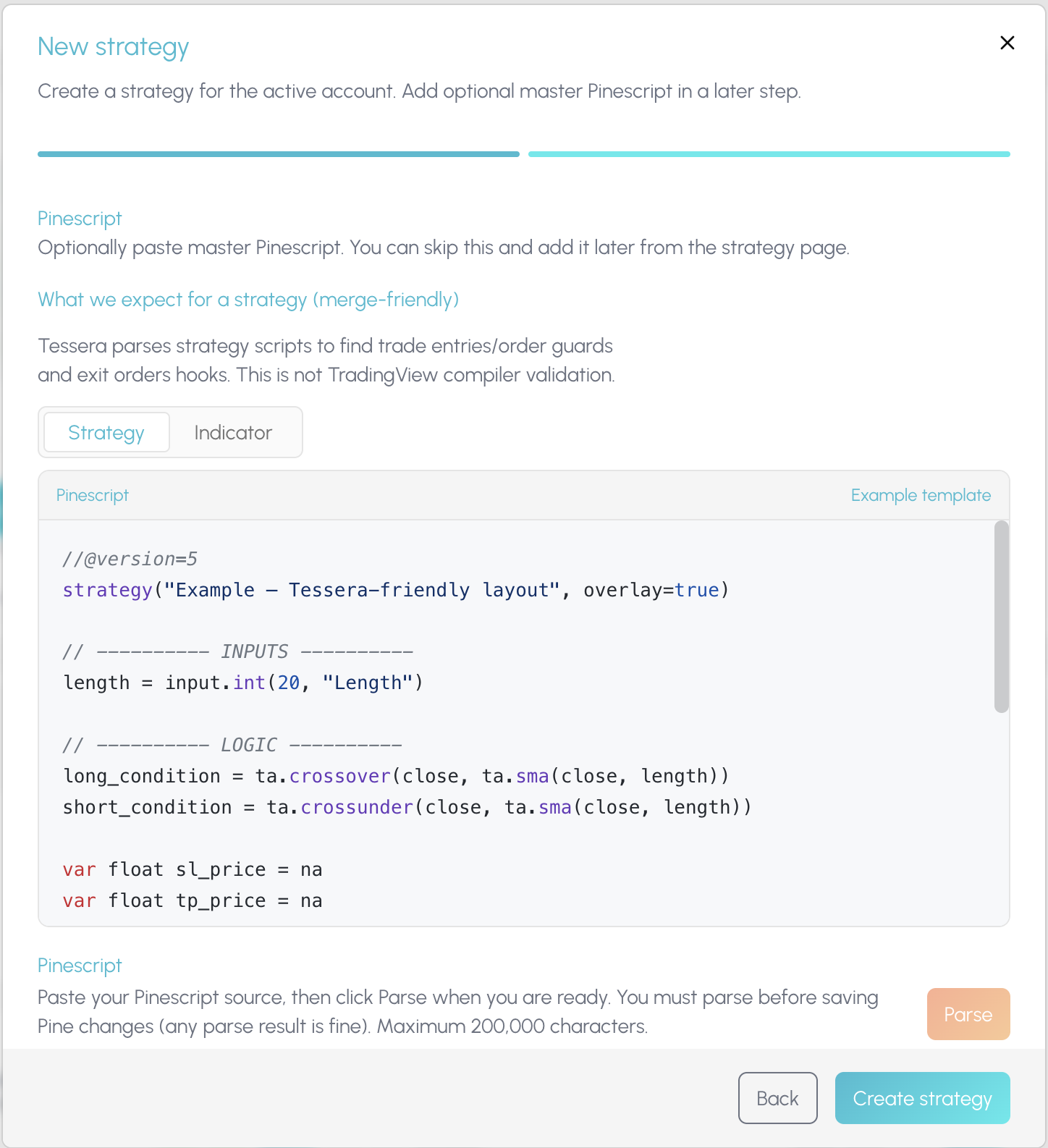
Once a policy is worth forward testing, Policy Pine composes it into TradingView. Merge the rule into a copy of your existing strategy script, or export it as a standalone indicator you paste onto the chart yourself.

Tessera does not auto-push to your TradingView account. You stay in control of what hits the chart. The composed Pine is the bridge from a tested cohort back into live forward testing, with the experiment trail still sitting in Tessera.

  • Merge a tested rule into your script
  • Or export a standalone TV indicator
  • You paste; nothing auto-deploys
  • Forward test on TradingView candles
  • Keep the experiment trail in Tessera
  • Bridge from cohort to live chart
Composing a Tessera policy into TradingView Pine

Connected workspace

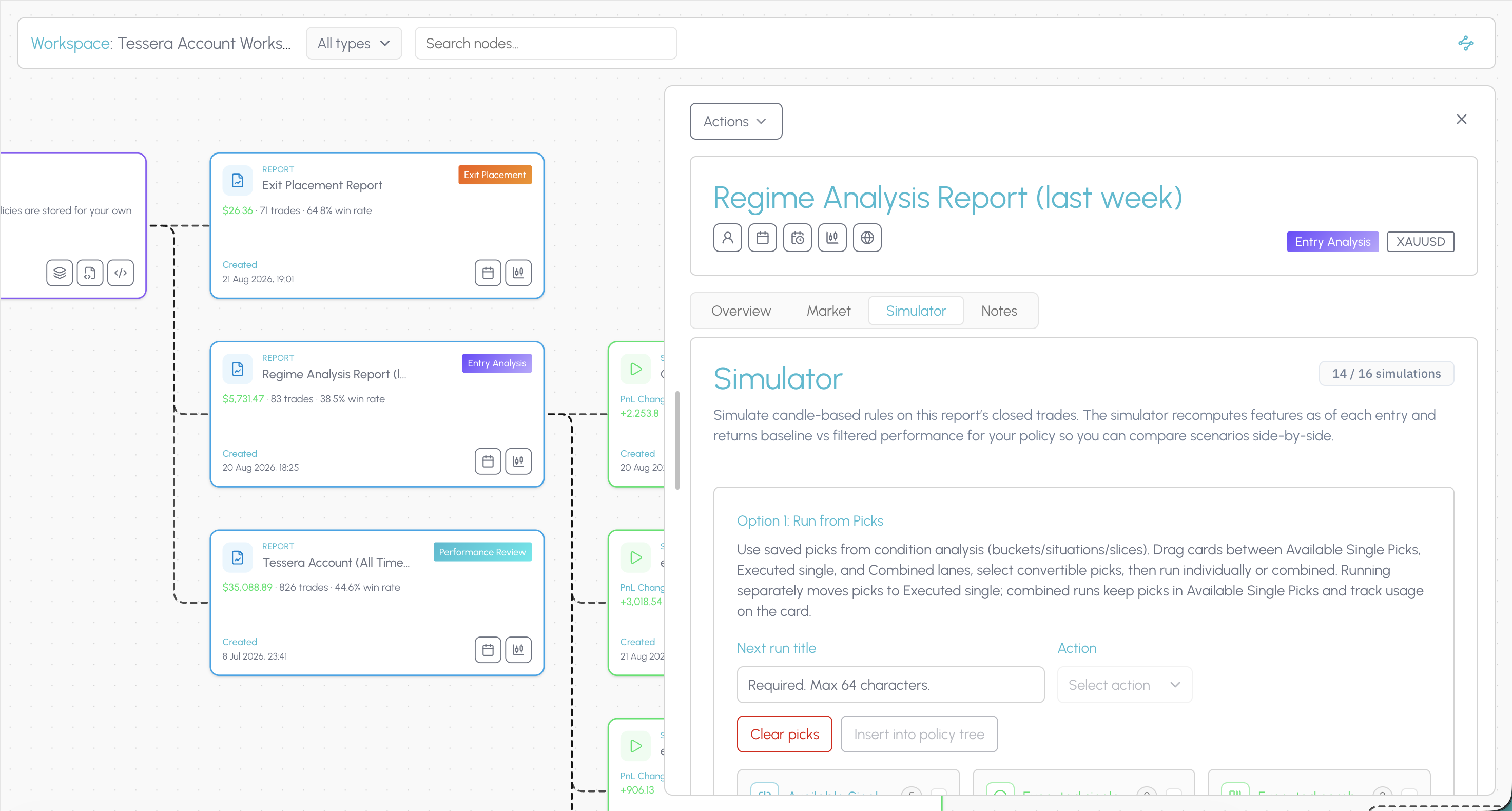
The connected workspace is where the suite stops being a list of tools. The hub shows every strategy, report, simulation and policy you have built. Open a canvas and those pieces become a node graph linked by what produced what.

When a filter improves a cohort, you can still see the Entry Analysis that surfaced it, the simulation that tested it, and the policy you exported, on the same trail. That is how you know whether a change held up across your process, not only whether one review session felt better.

TES can narrate a prepared report when you run one. Tessera does not ship a dedicated tilt score or an automated weekly scan of your whole journal. Findings are hypotheses, not conclusions. Forward test before you commit size.

  • See every strategy, report, and sim in one hub
  • Open a canvas where artefacts link by lineage
  • Trace a policy back to the report that found it
  • See the sim that proved a change
  • Know whether a rule held up over time
  • Stop hopping tabs for the full picture
Tessera connected workspace canvas linking strategies, reports, simulations and policies

Ready to try Tessera for free?

Connect your trade log, run focused reports, and test one rule change at a time on trades you already took.

Other TraderSync alternatives worth knowing

The realistic shortlist in 2026:

ToolRoughlyPick it when
TradeZella$35 to $99 a monthYou want polished tick replay, playbooks and PropFirm Sync. See the TradeZella alternative comparison
TradervueFree tier (30 trades a month), $29.95 or $49.95You want granular statistics such as MFE, MAE and exit efficiency, and a free way to start
Edgewonk$197 a yearYou want behavioural analysis on a one off annual licence. Desktop only. See the Edgewonk alternative comparison
TradesVizFree tier, paid plans aboveYou want charting volume and analytics depth above all else
Tessera$19 or $39 a monthYou want to test rule changes on real fills, then export the rule to TradingView as Pine

Switching from TraderSync to Tessera

  1. Export your closed trades from TraderSync as a CSV. Do this while your subscription is live, since export is easier with full access.
  2. Map the file once. Import through Custom CSV, match your columns to Tessera fields, and save the mapping as a template.
  3. Connect your broker for anything new. Use a native path where one exists so the log stays current.
  4. Run your first report. Entry Analysis on the full history returns condition slices in a few minutes.
  5. Test one change. Take the strongest slice into the simulator, keep everything else fixed, and see what those same trades would have returned.
  6. Save and export. Store the result as a policy and compose the Pine so the rule is on your chart while you forward test.

If your broker is on TraderSync's native list but not ours, keep the CSV route. Map once and the template is reusable every month.

Tessera simulator comparing a higher timeframe aligned cohort against the original closed trade history

Choose Tessera if

You are rules based, or you write Pine, and you want policy export rather than only AI chat

You want to test a rule against the trades you actually took, not hypothetical trades on old charts, with the simulator

You prefer TES, which reads prepared statistics and is not metered by daily messages

You want the full feature set at $19 a month rather than the useful parts at $49.95

You need a Custom CSV template for an unsupported statement format

You want a connected workspace that links your data, testing and the results of your changes in one overview

Prefer TraderSync if

Cypher coaching, and Coach on Elite, is how you want to improve

Native mobile apps for logging on the go are essential

Granular or Level II style replay is central to your review

You need the widest possible broker list out of the box

A free trial before you pay is non negotiable

TesseraFAQs

Your questions, answered

View all FAQs

Other Alternatives

TraderSync is a trademark of its respective owner. Tessera is not affiliated with, endorsed by or sponsored by TraderSync. Comparisons reflect publicly available information as of 2 September 2026 and may change.

Ready to test a rule change on your own trades?

Run a free Entry Analysis report, simulate one filter on your closed history, and see whether the cohort improves before you change how you trade.