Tessera

Looking for an Edgewonk Alternative?Filter Entries, Not Just Exits

Edgewonk varies exits on the trades you took. Tessera does that too, filters which entries qualify, and exports the surviving rule to TradingView as Pine.

Edgewonk is the closest product to Tessera in this category, and we would rather say so than pretend otherwise. Both test what would have happened on trades you actually took. Edgewonk varies the exit. Tessera does that too, and also filters which entries qualify, then composes the surviving rule into Pine for TradingView.

Quick answer: Edgewonk vs Tessera

EdgewonkTessera
JournalingCustom tags, checklists, notebook, screenshotsTrade log notes, setup screenshots and trade review on the chart
StatisticsChart Lab analyticsStatistics and dashboard
ReportsChart Lab, 50 plus reportsPerformance, Entry and Exit reports
Discipline and psychologyTiltmeter, custom psychology fieldsNotes across trades, reports and simulations. No tilt score
Exit counterfactualsAlternative Strategy TestingSimulator varies SL and TP distance
Entry counterfactualsNot possibleSimulator filters entries by condition
Rules exportNot possiblePine Script export for use on TradingView
PricingNo monthly pricing. Single lump sum, around $197Standard $19 / Plus $39 a month, or $180 / $372 yearly
Choose whenDiscipline scoring and exit managementFull connected workflow: journal, reports, simulation, policy and export in one feedback loop

In plain English: Edgewonk asks what different exits would have done to the trades you took. Tessera asks that too, and also asks which of those trades you should have taken at all, then hands you the rule as Pine.

Edgewonk details below are summarised from public pages as of September 2026. Confirm on their site before you buy.

What Tessera offers that Edgewonk does not

Edgewonk's strongest analytical move is on the exit. Alternative Strategy Testing takes the trades you already entered and asks what different stops, targets or management would have done. That answer is real, because the entries stay at the prices you actually got.

Tessera covers that same ground. The simulator can vary stop loss and take profit distance across your closed cohort. The difference is what happens next: Tessera also lets you filter which entries belong in the cohort at all.

That is the other half of the puzzle. Exit work asks how a trade should have been managed. Entry work asks whether the trade should have been there in the first place.

Both pieces together

Most rule based traders need both. You still want to know whether a wider stop would have helped the trades you took. You also want to know whether a slice of those trades should never have been opened.

Edgewonk answers the first. Tessera answers both, and lets you run them together: combine an entry filter with an exit change in a combined simulation, save what holds up as combined policies, and keep the whole trail visible in the connected workspace. From there you can compose the result into Pine for TradingView and forward test it on the chart.

Exit: how the trade ended

"Move my stop to 1.5R." "Take profit earlier when the session turns." These are management questions. Edgewonk answers them well, and Tessera answers them too by replaying different exit distances on the same fills.

If exit management is the only question you bring to the week, Edgewonk already has a serious tool for it.

Entry: which trades belong

"Only take London when price is above the 50 period SMA." "Skip New York entries that sit too close to support." These are different questions. They remove trades from the record rather than changing how they exited.

Tessera's simulator keeps or drops entries by the conditions present when you took them: session, trend, volatility, indicator state. The cohort changes. The result is what your history would have looked like if those entries never qualified.

Choose Tessera if

You want to test which entries to skip, not only how to exit the ones you took, with the simulator

You write Pine, or trade from TradingView, and want a tested rule back on the chart through Policy Pine

You prefer monthly billing to a lump sum

You need Custom CSV templates for awkward statement layouts

You want a review loop that ends in something exportable, from reports through simulation to a policy

You want a connected workspace that links your data, testing and the results of your changes in one overview

Prefer Edgewonk if

The Tiltmeter and psychology first custom fields are what you open every week

Edge Finder Sunday scans are how you review

Chart Lab depth, Sharpe, Sortino, SQN, MFE and MAE, is your primary workflow

Exit and trade management is the question you keep asking

You trade MetaTrader 4 or 5 and want direct auto sync

Cost per month is the deciding factor

What Edgewonk does well

Edgewonk earned its reputation on behavioural self analysis, and it is still the strongest tool in the category for it.

The Tiltmeter quantifies discipline violations with a specificity nothing else matches. Setup checklists and custom psychology fields let you grade rule adherence trade by trade. Chart Lab runs 50 plus reports including Sharpe, Sortino, SQN, MFE and MAE, holding time analysis and streak work. The Edge Finder, added in late 2025, runs an automated scan across your whole journal every Sunday and surfaces your strongest setups and biggest mistakes without you asking.

There is no feature tiering. Everything ships on the plan. Edgewonk also never takes your broker login or password, which is one of the cleanest credential models in the category, and it auto syncs one directionally with MetaTrader 4 and 5, which matters if you trade forex.

If the ONLY question you open the week with is whether you followed your own rules, Edgewonk is very hard to beat.


Edgewonk Alternative Strategy Testing vs the Tessera simulator

The short version is above. This is the same comparison in product terms.

Edgewonk's Alternative Strategy Testing, along with the Trade Management Optimizer and Performance Simulator, takes your real historical entries and varies what happened afterwards. Different stop levels, different targets, different exit behaviour. Because the entries are fixed at the prices you actually got, the answers reflect your real timing rather than a generic backtest. It is a genuinely good feature and most journals have nothing like it.

Tessera's simulator does the same thing on the exit side, varying stop loss and take profit distance across the same closed cohort. It then filters which entries belong in the cohort at all, based on the market conditions present when you took them.

EdgewonkTessera
Starts fromYour real entriesYour real entries
Varies exitsYes, stops, targets and managementYes, SL and TP distance
Filters entries by conditionNo, every entry stays inYes, keep or drop entries by session, trend, volatility, indicator state
OutputReport inside EdgewonkCohort comparison, saved as a policy
Rule leaves the platformNoYes, composed into Pine for TradingView

Test one entry filter on your own trades

Run a free Entry Analysis report, then simulate dropping one group of trades from the history you already took.

Why traders look for an Edgewonk alternative

The common triggers:

You want to test which trades to skip, not only how to manage the ones you took.

You write TradingView Pine and want a bridge from a tested rule back onto the chart. Edgewonk is journal centric and does not compose Pine.

The lump sum does not suit you. Around $197 up front is good value if you stay. It is a real commitment if you are not sure yet.

You want monthly billing you can stop without having pre paid a year or more.

Import friction. Auto sync is strongest on MetaTrader. Other platforms often mean CSV import.

Terms keep moving. Public accounts of Edgewonk pricing differ across the year, which makes it harder to know what you are buying.

How the Tessera workflow fits together

Tessera is a connected product suite on your closed trades: journal and statistics, focused reports, a simulator, policies, and Pine export, kept together on one workspace.

Trade Log

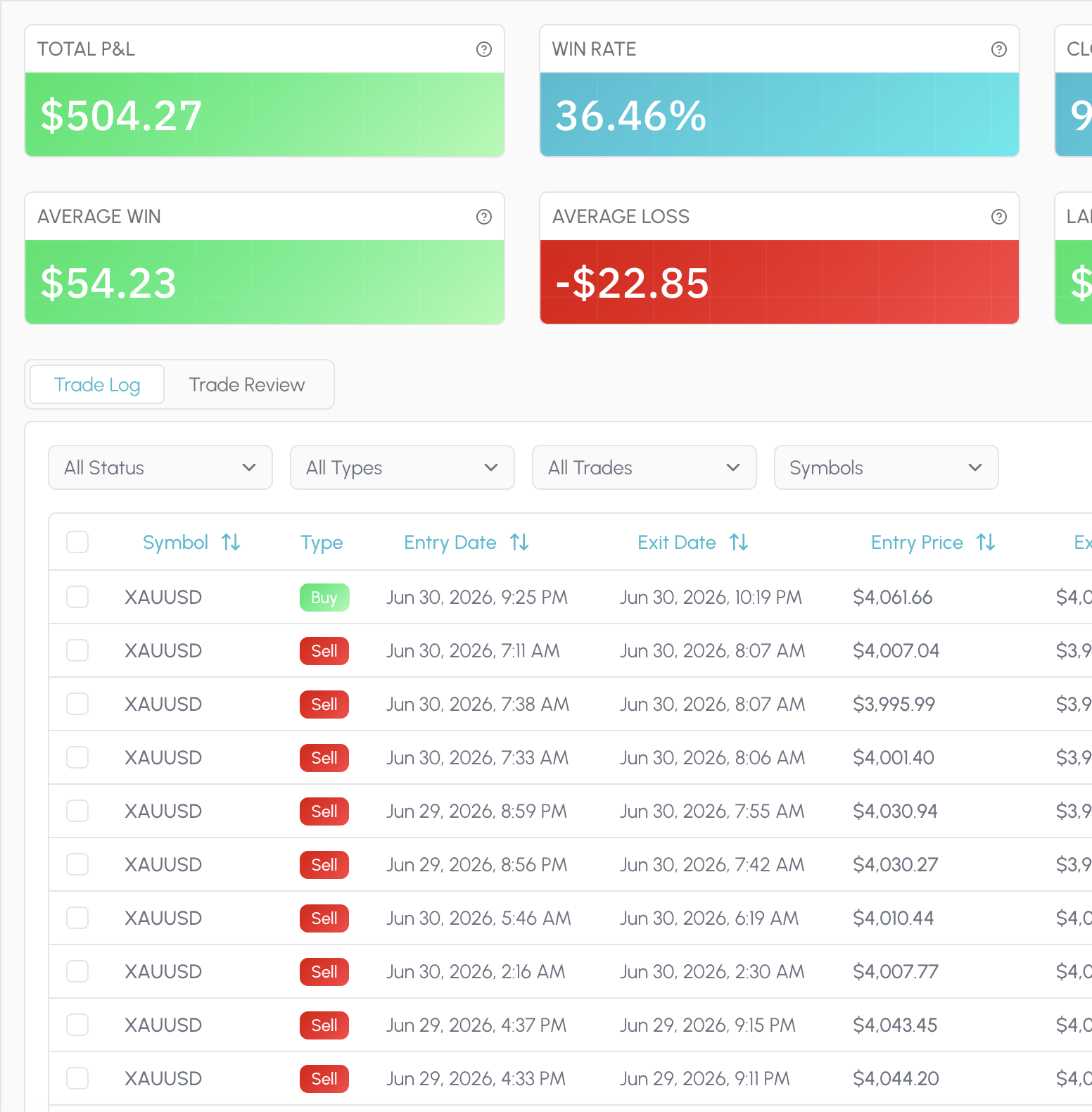
Every fill lives in one place: synced from a broker or imported once through Custom CSV with a mapping you can reuse. Attach a market snapshot and a short note when the trade still matters, not as a mood ritual, but as context for later review.

That same history feeds everything else in Tessera. Statistics, reports, simulations and policies all read the closed trades you already took, so you are not stitching exports together every Sunday.

  • Sync supported brokers in one click
  • Map a CSV once, reuse the template
  • Snapshot the chart state at the fill
  • Optional notes, no mood checklist
  • Same fills power every later view
  • Review without a Sunday spreadsheet merge
Tessera Trade Log with notes and setup context on closed trades

Statistics

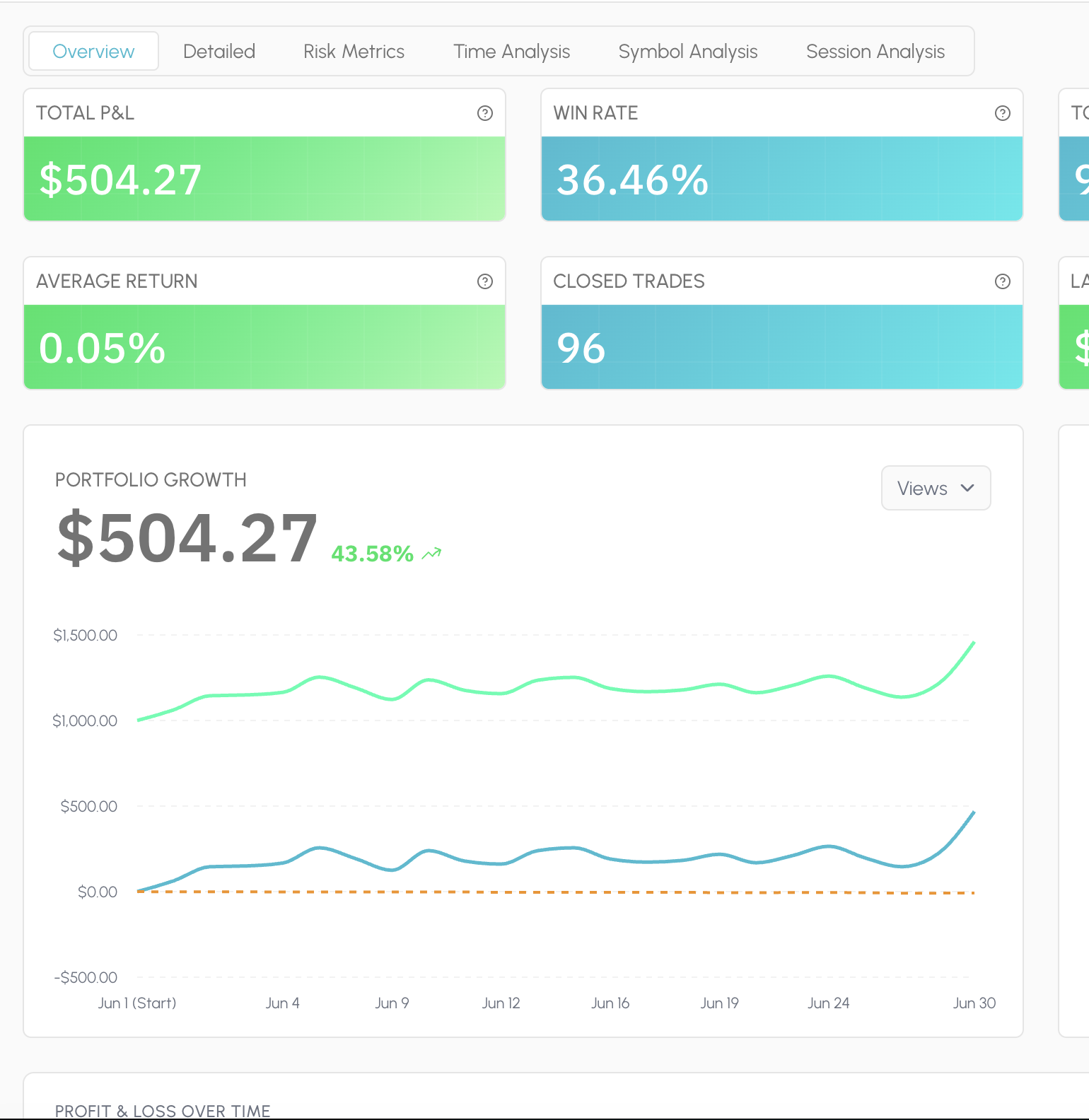
Statistics is the always-on read of your book: PnL, win rate, expectancy, drawdown, sessions, symbols, timing and risk, laid out so you can scan a period and move on. Filter the window and the charts follow the trades you selected.

There is no proprietary Tessera score and no composite grade that flattens your account into someone else's ideal profile. The dimensions stay checkable. When you need a deeper cut than the dashboard, you leave Statistics and run a focused report.

  • P&L, win rate, expectancy, drawdown
  • Cut by session, symbol, and timing
  • Filter a period; charts follow
  • Standard metrics you can audit
  • No proprietary composite score
  • Hand off to a report when you dig in
Tessera Statistics dashboard showing session and symbol metrics

Reports

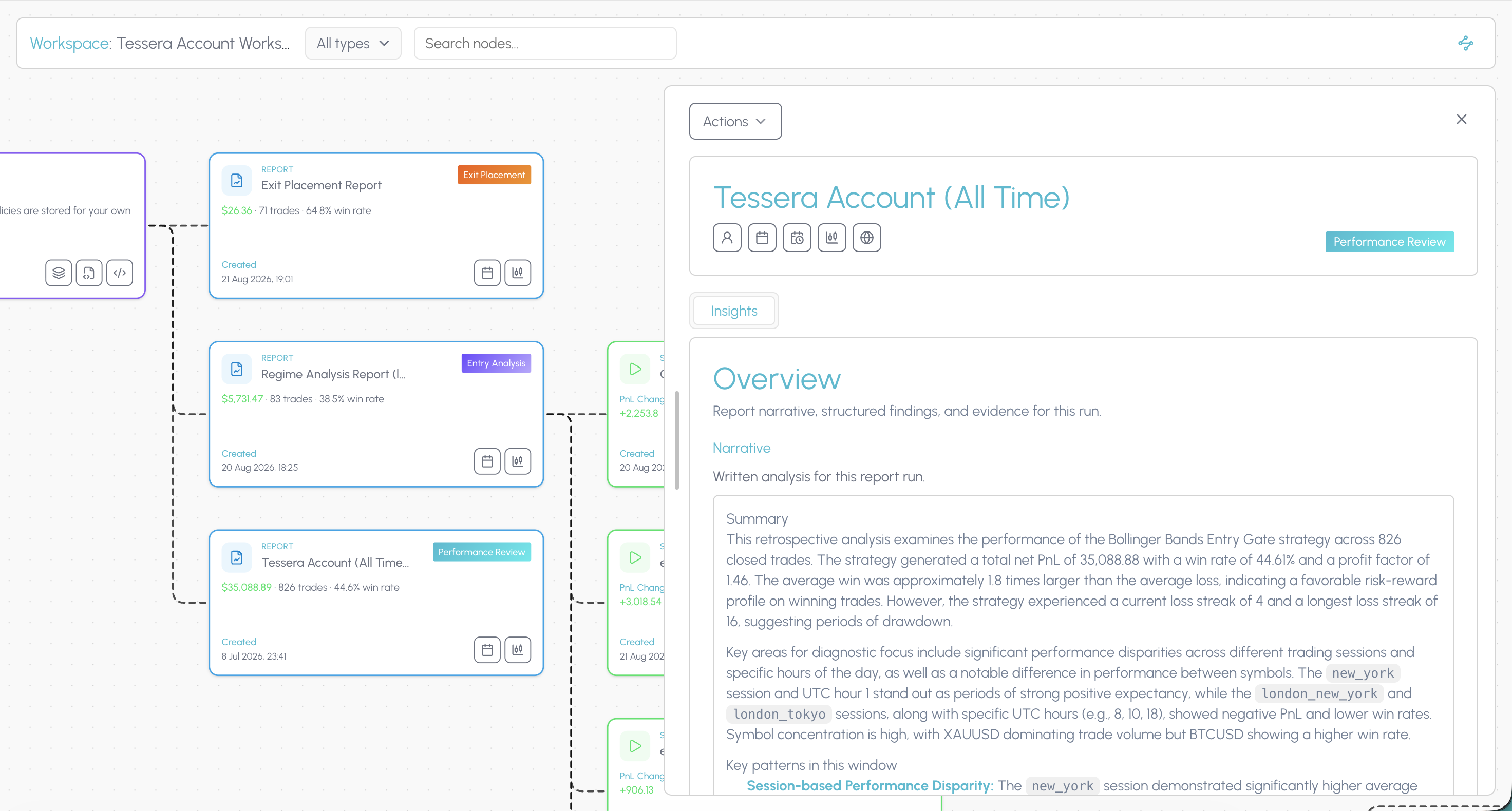
Reports answer a specific question on the same closed history. Performance Review for how a strategy or period actually behaved. Entry Analysis for which conditions at entry separated winners from losers. Exit Placement for whether stops and targets were doing their job.

Condition slices surface the pattern in plain terms: session, trend, volatility, distance to a level, indicator state. You leave with a cohort you can name, not a vague sense that "New York was bad." That cohort is what you take into Trade Review and the simulator next.

  • Which entry conditions actually paid
  • Whether your stops earned their keep
  • Session, trend, and volatility slices
  • Distance-to-level cohorts you can name
  • A finding you can take into the sim
  • Built on fills you already took
Tessera Entry Analysis report with condition slices

Trade Review

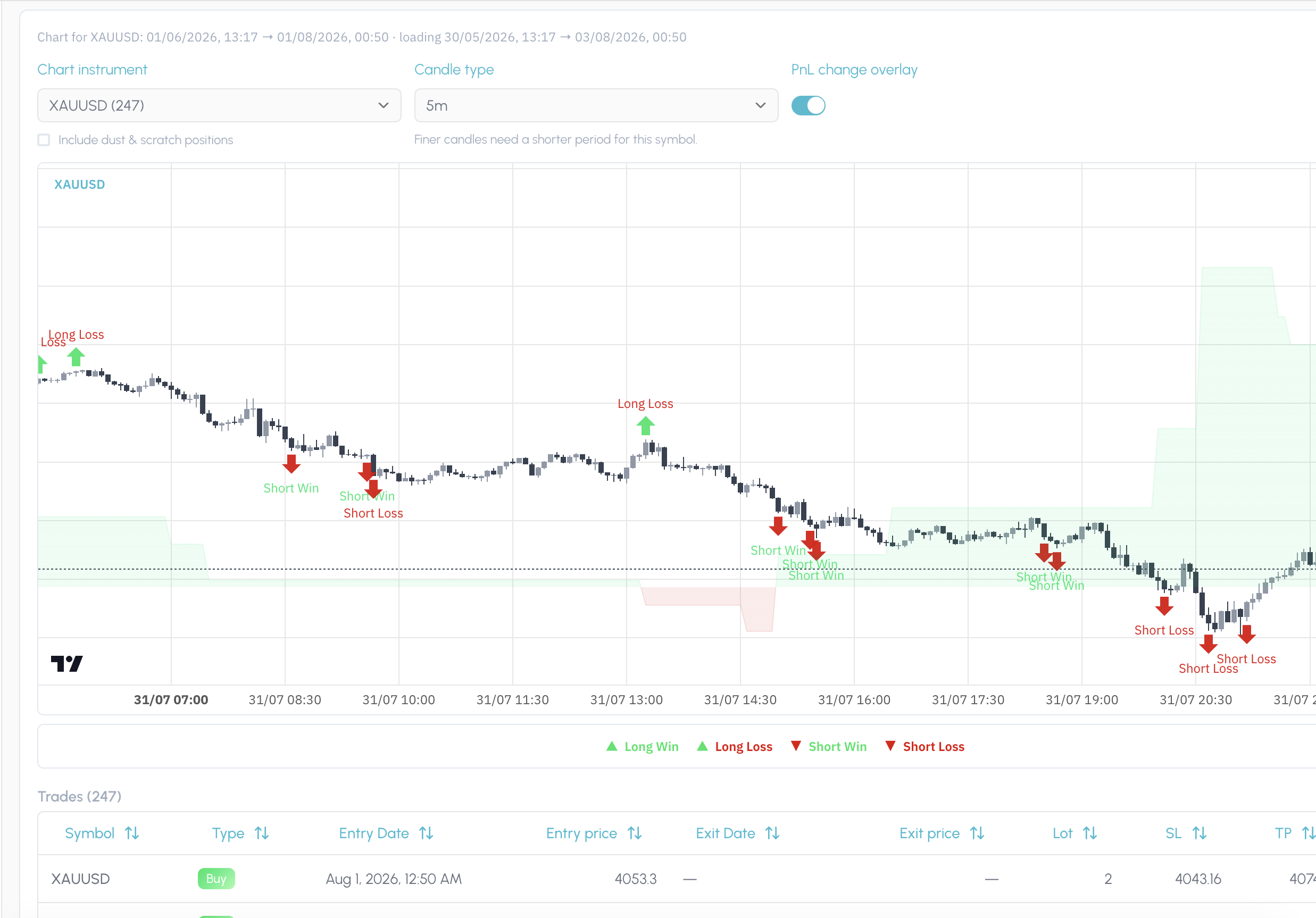
Trade Review puts your fills back on the chart in the price action and regime they happened in. After a report pick or a simulation, it also shows exactly which trades that finding or policy covers, so you are not guessing from a table of ticket IDs.

Use it to confirm the story before you change a rule. If the slice looks wrong on the chart, you catch it here. If it looks right, you have visual proof of the cohort you are about to test.

  • See each fill on the live candles
  • Regime and context at the entry
  • Highlight every trade in a report pick
  • Preview which fills a sim would touch
  • Catch a bad slice before you change rules
  • Visual proof before you save a policy
Tessera Trade Review charting the fills covered by a finding

Simulator

The simulator asks what would have happened if you had traded the same closed history under a different rule. Keep or drop entries by the conditions present when you took them: session, trend, volatility, indicator state. Or leave the entries alone and vary stop loss and take profit distance.

Run one change at a time so you can see what moved. Compare the filtered cohort against the original. If the result holds up, you are ready to save it as a policy rather than leaving the insight in a screenshot folder.

  • Drop entries by session or condition
  • Test wider or tighter SL / TP distance
  • Hold everything else fixed
  • Compare filtered vs original cohort
  • Counterfactuals on your real fills
  • Promote a result into a policy
Tessera simulator cohort comparison after an entry filter

Policies

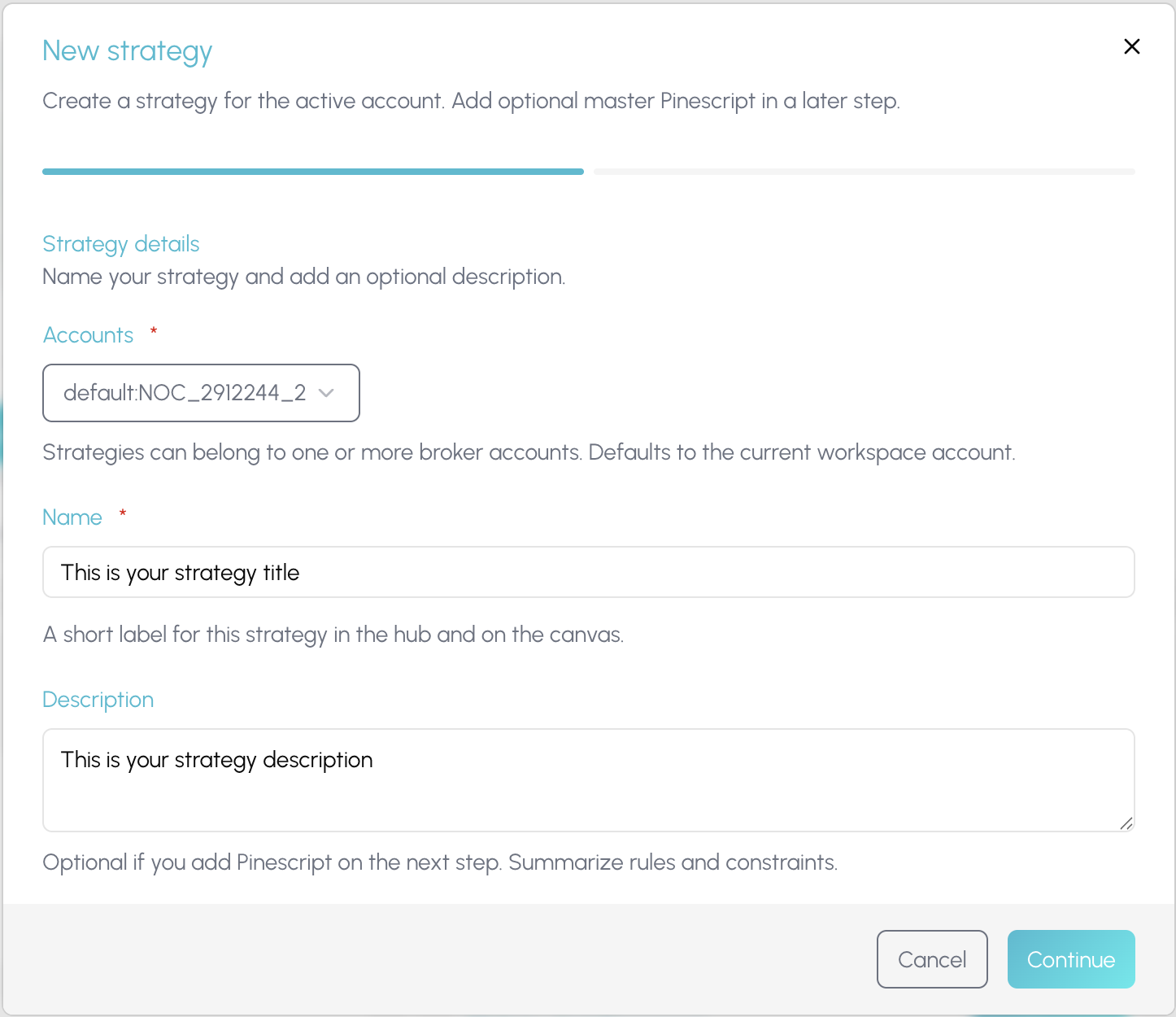
A policy is a versioned rule attached to a strategy: the keep filter, the veto, the exit distance that survived a simulation. It is not a note in a journal and not a half-remembered habit from last month's review.

When something holds up, you save it, name it, and keep it on the strategy so you can return to it, combine it with other policies, and re-test the stack. The point is a rule you can defend, not a feeling that you should "be more selective in New York."

  • Keep filters and veto rules, versioned
  • Exit distance saved on the strategy
  • Name the rule so you can find it again
  • Stack policies and re-simulate together
  • Return to last month's tested change
  • A rule you can defend, not a feeling
Creating a strategy and policy in Tessera

Policy Pine

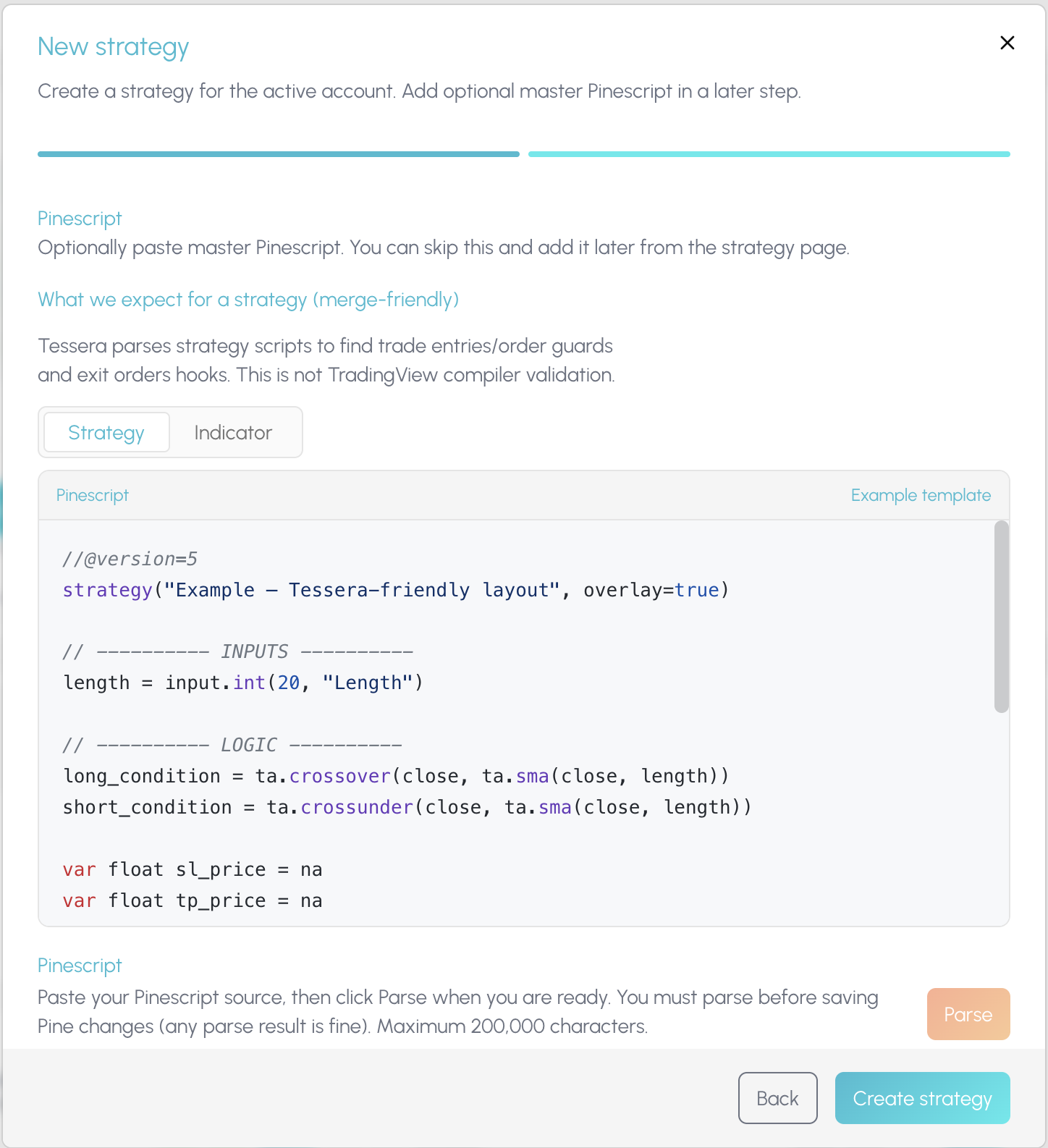
Once a policy is worth forward testing, Policy Pine composes it into TradingView. Merge the rule into a copy of your existing strategy script, or export it as a standalone indicator you paste onto the chart yourself.

Tessera does not auto-push to your TradingView account. You stay in control of what hits the chart. The composed Pine is the bridge from a tested cohort back into live forward testing, with the experiment trail still sitting in Tessera.

  • Merge a tested rule into your script
  • Or export a standalone TV indicator
  • You paste; nothing auto-deploys
  • Forward test on TradingView candles
  • Keep the experiment trail in Tessera
  • Bridge from cohort to live chart
Composing a Tessera policy into TradingView Pine

Connected workspace

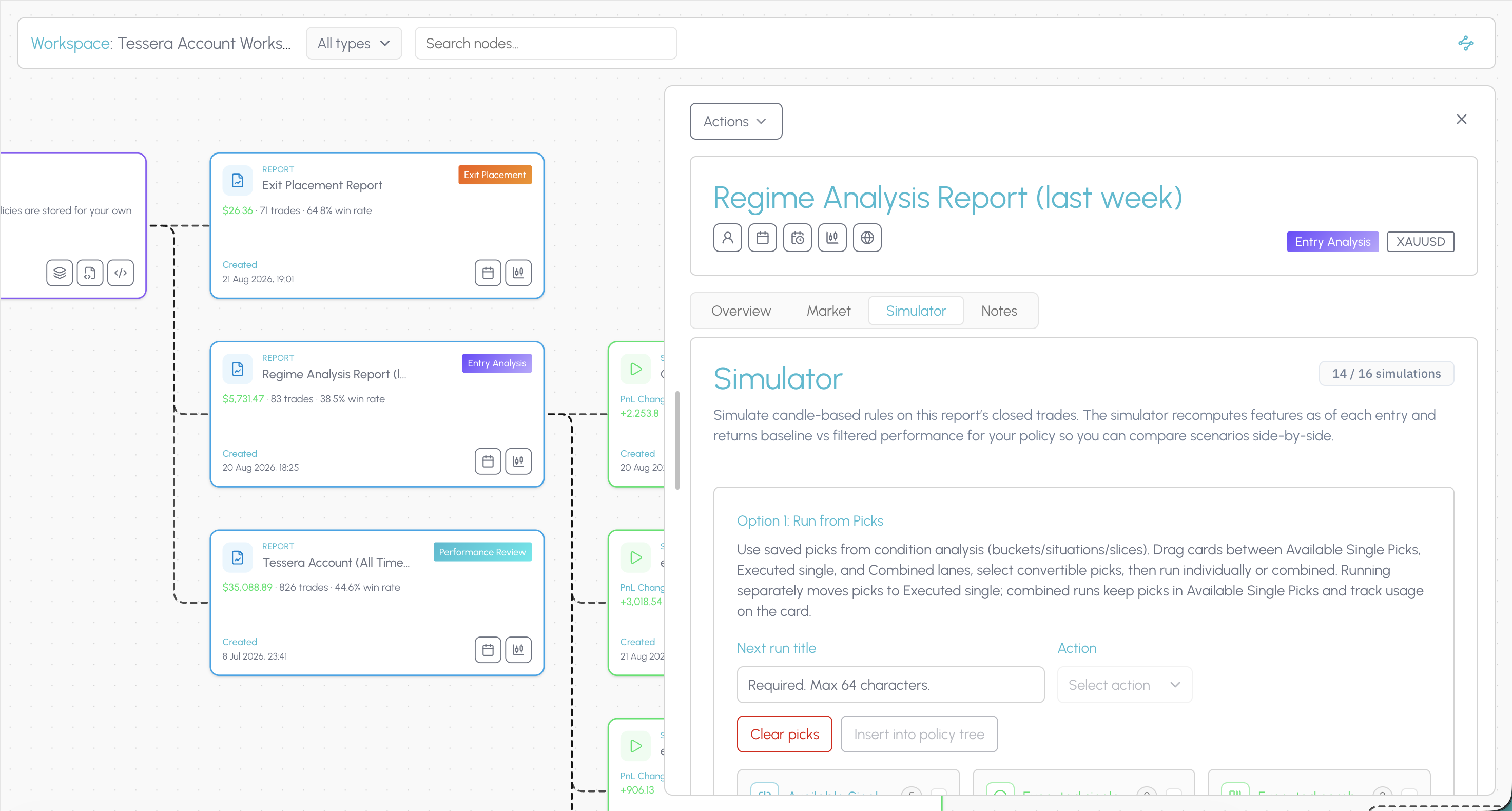
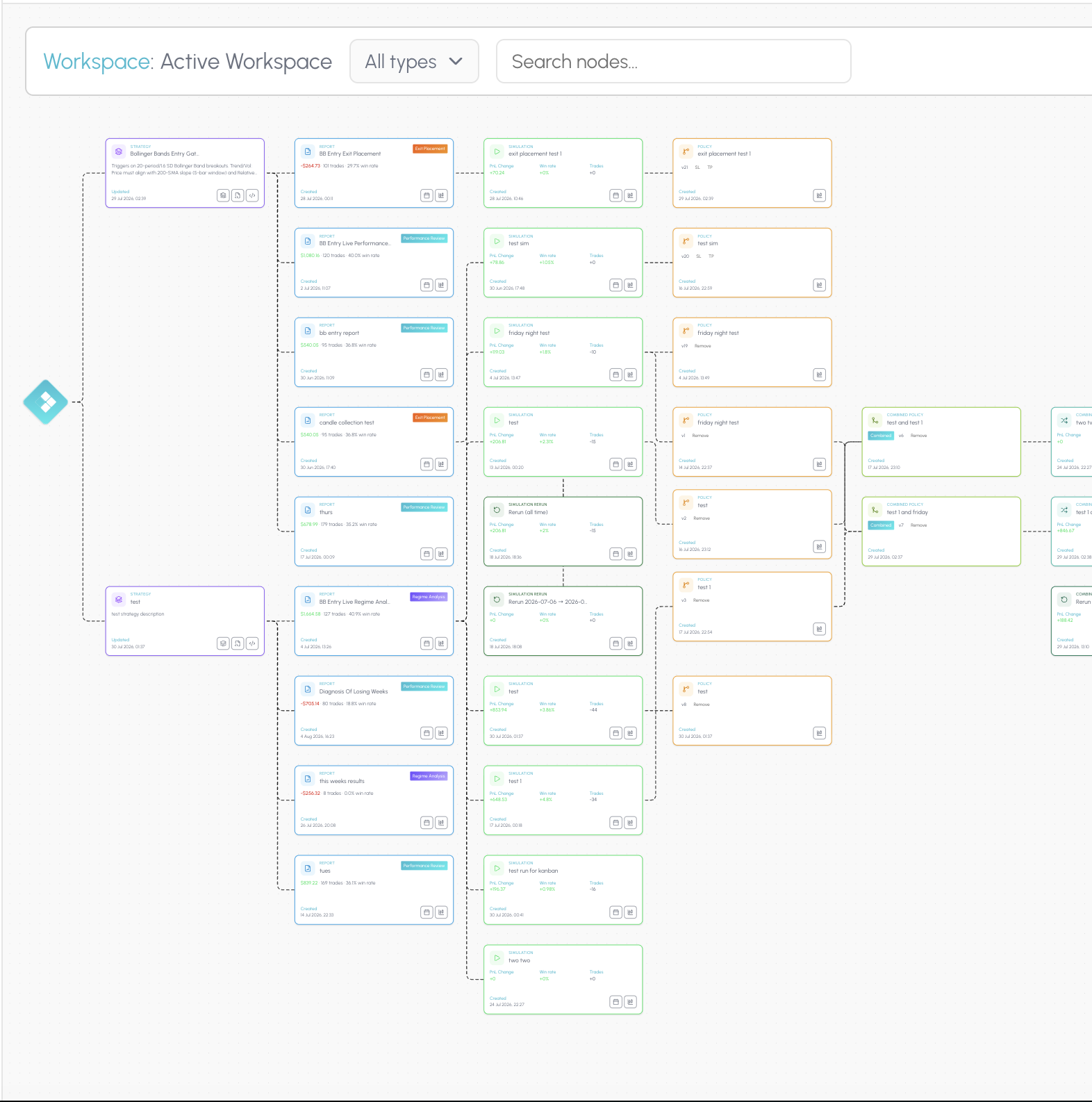
The connected workspace is where the suite stops being a list of tools. The hub shows every strategy, report, simulation and policy you have built. Open a canvas and those pieces become a node graph linked by what produced what.

When a filter improves a cohort, you can still see the Entry Analysis that surfaced it, the simulation that tested it, and the policy you exported, on the same trail. That is how you know whether a change held up across your process, not only whether one review session felt better.

TES can narrate a prepared report when you run one. Tessera does not ship a dedicated tilt score or an automated weekly scan of your whole journal. Findings are hypotheses, not conclusions. Forward test before you commit size.

  • See every strategy, report, and sim in one hub
  • Open a canvas where artefacts link by lineage
  • Trace a policy back to the report that found it
  • See the sim that proved a change
  • Know whether a rule held up over time
  • Stop hopping tabs for the full picture
Tessera connected workspace canvas linking strategies, reports, simulations and policies

Ready to try Tessera for free?

Connect your trade log, run focused reports, and test one rule change at a time on trades you already took.

Switching from Edgewonk to Tessera

  1. Export your trades from Edgewonk as a CSV. Do this before your term lapses so you keep the full history.
  2. Map the file once. Import through Custom CSV, match your columns, and save the mapping as a template.
  3. Connect your broker for anything new. Use a native path where one exists.
  4. Run your first report. Entry Analysis on the full history returns condition slices in a few minutes.
  5. Test one entry filter. Take the strongest slice into the simulator, hold everything else fixed, and see what dropping those trades would have done.
  6. Save and export. Store the result as a policy and compose the Pine so the rule is on your chart while you forward test.

Your psychology tags will not carry across in any meaningful way. If that history matters to you, keep the Edgewonk export somewhere safe.

TesseraFAQs

Your questions, answered

View all FAQs

Other Alternatives

Edgewonk is a trademark of its respective owner. Tessera is not affiliated with, endorsed by or sponsored by Edgewonk. Comparisons reflect publicly available information as of 2 September 2026 and may change.

Ready to test a rule change on your own trades?

Run a free Entry Analysis report, simulate one filter on your closed history, and see whether the cohort improves before you change how you trade.