

Can Claude or Codex Backtest With TradingView? What Works in 2026
Can Claude Code or Codex backtest a strategy through TradingView MCP? What the official server can and can't read, the three routes that work, and how to check the result.
By Hristo Skulev · Updated · 4 min read
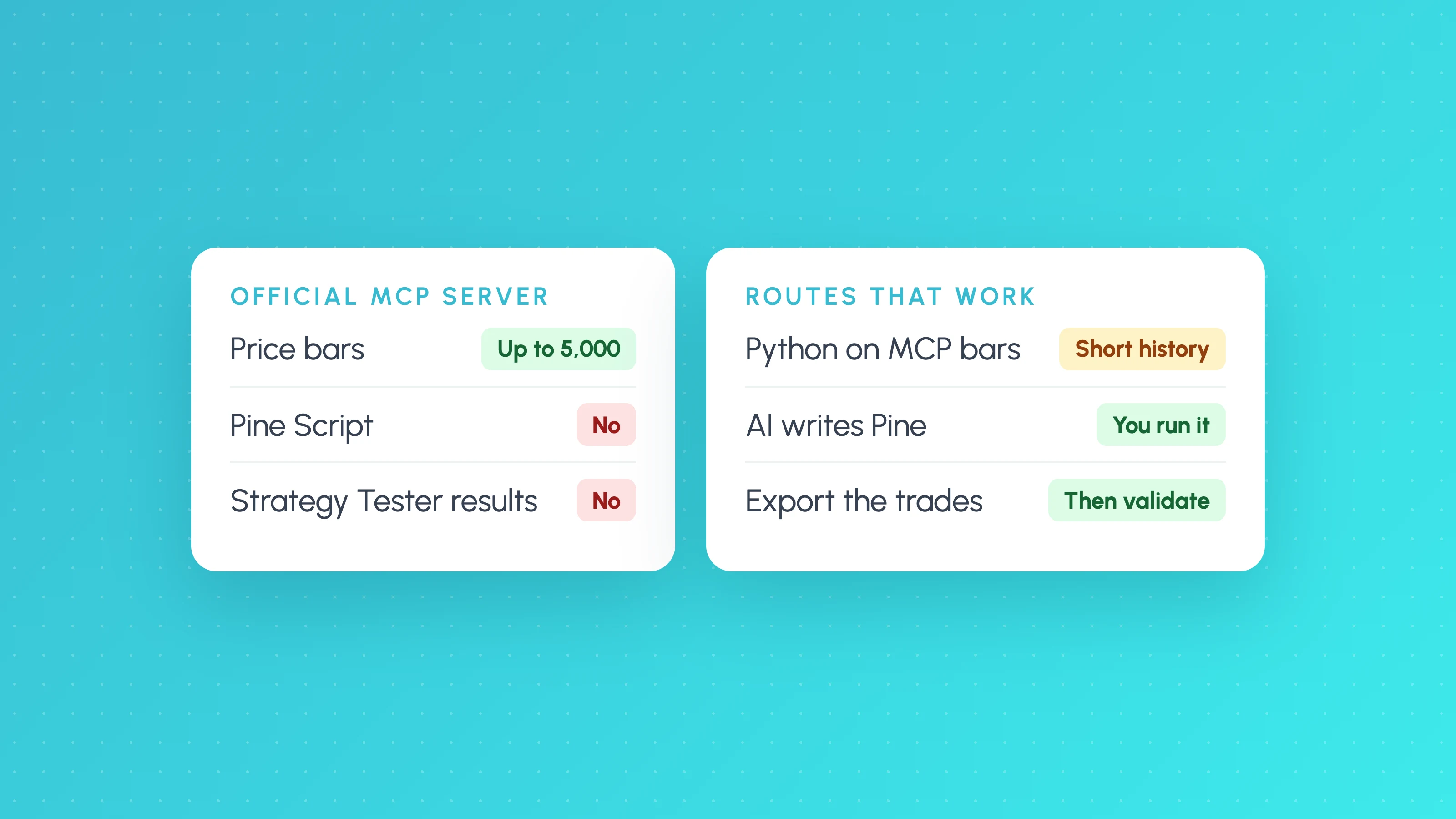
Not directly through TradingView's official MCP server. It gives Claude, Claude Code and Codex market data, the screener, news and your watchlists and alerts, but it can't read or write Pine Script and it can't read Strategy Tester results. To backtest with an AI assistant and TradingView you have three working routes: have the assistant write a Python backtest on bars it pulls through the MCP server, have it write Pine Script that you run in the Strategy Tester yourself, or export the Strategy Tester's list of trades and have the assistant (or a backtesting tool) analyse it. Each has limits worth knowing before you trust the number it gives you.
If you haven't connected it yet, the setup commands are in our guide to connecting Claude or Codex to TradingView, and what the TradingView MCP server can and can't do lists all 35 tools.
AI-written backtests are as likely to contain mistakes as any other code. Backtests are not future results, and leveraged trading carries a high risk of loss.
What the official TradingView MCP server gives an AI
| It can | It can't |
|---|---|
| Pull OHLCV bars (up to 5,000 per request) | Read or write Pine Script |
| Run the screener and read technical ratings | Read Strategy Tester results or trade lists |
| Read news, fundamentals and calendars | Place trades |
| Read and change your watchlists and price alerts | Run a backtest inside TradingView |
So an assistant connected to the official server can see prices, but it can't see your strategy's results. Community "desktop bridge" servers that control the TradingView Desktop app can read Strategy Tester data, but they use undocumented internal interfaces and TradingView doesn't support them. Read what any community server or "skill" does before you install it, and never give one your broker credentials.
Route 1: Claude or Codex writes a Python backtest on MCP data
Ask the assistant to pull bars with get_ohlcv and write a backtest in Python.
Good for: a quick first look at a simple idea.
Watch for:
- Short history. On a market that trades 23 hours a day, 5,000 bars is about three and a half days of 1-minute data or about 18 days of 5-minute data. That's far too little for an intraday strategy.
- Look-ahead bias. AI-written backtests often use the close of a bar to enter on the same bar, or use higher-timeframe values before that bar has closed.
- No costs or fills. Unless you ask, most generated backtests ignore commission, spread and slippage, and assume every limit order fills.
- Rule drift. The code may not match what you asked for. Ask the assistant to list the exact rules it implemented and check them.
Route 2: the assistant writes Pine Script, you run it in TradingView
Ask Claude Code or Codex to write the strategy as Pine Script v6, paste it into the Pine Editor and run the Strategy Tester.
Good for: using TradingView's data and fill model on a longer history.
Watch for: compile errors (paste them back to the assistant), request.security look-ahead, and settings that flatter results, such as zero commission or "on bar close" fills that aren't realistic. Our guide to Claude for Pine Script covers prompts and checks.
Route 3: export the trades and validate them
Once the Strategy Tester has run, export the list of trades (how to export Strategy Tester results) and analyse it: by session, weekday and volatility, with Monte Carlo, and on the period the strategy wasn't tuned on.
Good for: finding out whether the result is real before you automate it. Our backtest validation checklist lists the ten checks.
Or skip the code
If what you want is "describe a strategy in plain English and get an honest backtest", Strategy Lab does that without code: you describe the strategy to TES, the AI strategy coach, Strategy Lab reads the rules back in plain English before it runs, and the backtest runs on 1-minute to daily candles over up to 20 years of data, with an unseen period, Monte Carlo, costs and other-market tests. A strategy that holds up exports to TradingView as Pine Script v6 on paid plans.
A checklist for any AI-made backtest
- Ask the assistant to list the exact rules it implemented. Compare them with what you meant.
- Check the data length covers different market conditions.
- Check entries can't use information from the future.
- Add realistic commission, spread and slippage.
- Hold back an unseen period and look at it once.
- Count the trades. Fewer than about 100 tells you very little. See how many trades a backtest needs.
Frequently asked questions
- Can Claude backtest a strategy with TradingView MCP?
- Not inside TradingView. The official MCP server can give Claude price data (up to 5,000 bars per request), so Claude can write a Python backtest on those bars, but it can't read Pine Script or Strategy Tester results. For longer tests, have Claude write Pine Script and run it in the Strategy Tester yourself.
- Can Codex connect to TradingView?
- Yes. Codex can connect to TradingView's official MCP server with
codex mcp add tradingview --url https://mcp.tradingview.com/mcp, on an Essential TradingView plan or above. It gets the same tools as Claude: market data, screener, news, fundamentals, watchlists and alerts. - Is there a TradingView skill or plugin for Claude or Codex?
- TradingView's own integration is its MCP server. Community "skills", plugins and desktop bridges also exist; they are not supported by TradingView, and some control the desktop app through undocumented interfaces. Read what one does before installing it.
- Can AI read my TradingView Strategy Tester results?
- Not through the official MCP server. You can export the list of trades from the Strategy Tester and give the file to an assistant or a backtest analysis tool.
Keep reading
 AI and Pine Script
How to Connect Claude to TradingView (Official MCP Server, 2026)
claude mcp add --transport http mcp-tradingview https://mcp.tradingview.com/mcp: the setup for Claude Code, Codex and Claude desktop, and what it can't do.
 AI and Pine Script
TradingView MCP Server: What It Can and Can't Do (2026)
TradingView's official MCP server compared with community MCP servers: the 35 tools, plan requirements, limits, Pine Script access and which one to use.
 AI and Pine Script
How to Test a Trading Strategy ChatGPT or Claude Wrote
A step-by-step way to check an AI-written Pine Script strategy: catch lookahead and repainting, set realistic costs, test out of sample and by market condition.