

How to Automate Your Trading Strategy (Without Coding)
How to automate a trading strategy without coding: write exact rules, backtest with costs, paper trade, choose how orders reach your broker, then go live.
By Hristo Skulev · Updated · 11 min read
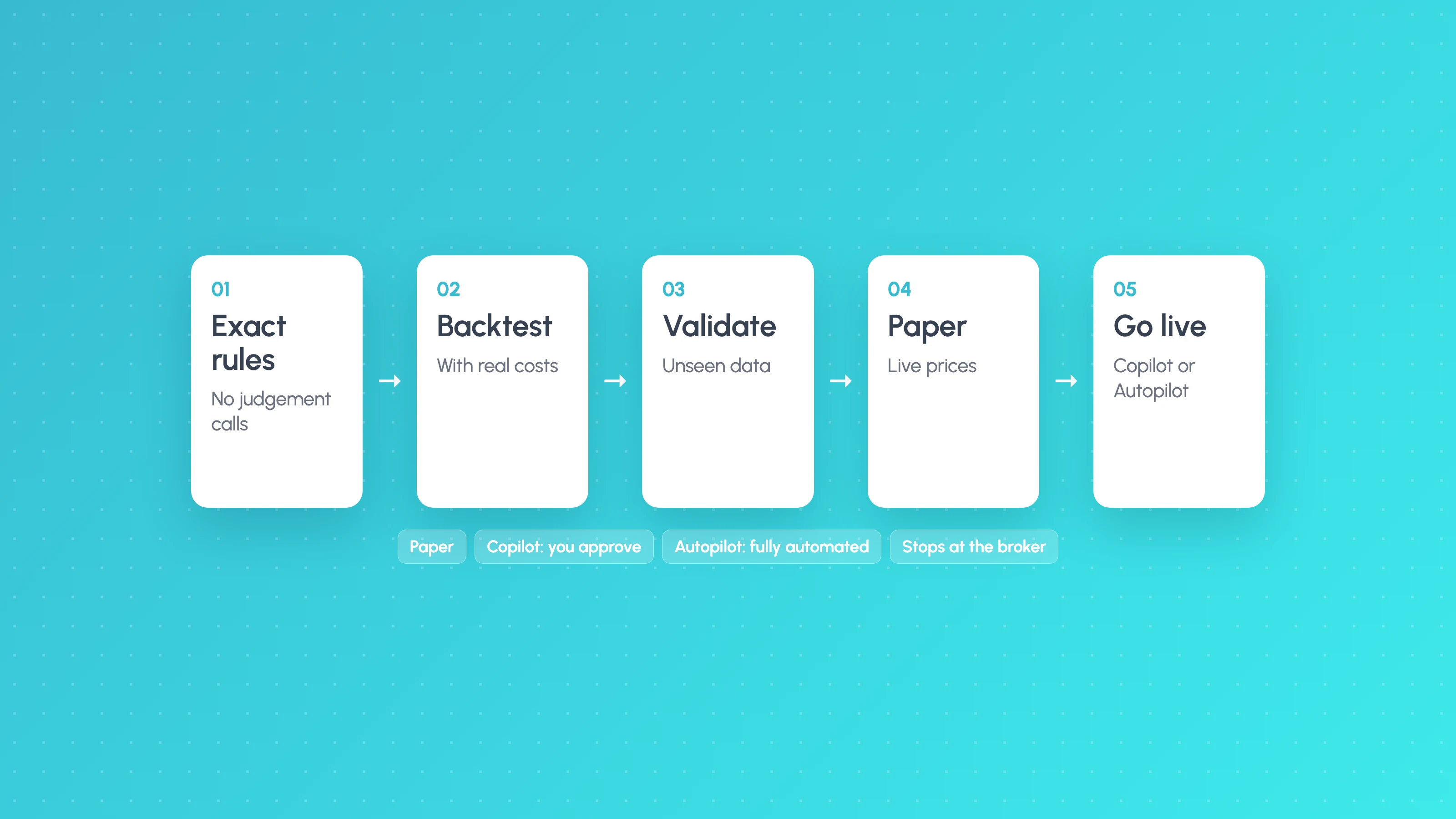
To automate a trading strategy, you turn it into exact rules, backtest those rules with realistic costs, check they hold up on data they were not built on, paper trade them on live prices, and only then connect them to your broker so orders are placed for you. You do not need to code any of it. What you do need is a route from your rules to your broker that runs the same logic you tested, plus hard risk limits.
There are four common routes: a coded bot inside your platform (an MT5 Expert Advisor or a cTrader cBot), TradingView alerts sent through a webhook tool, an exchange's built-in bots, or a platform that runs the same code as your backtest. Which one fits depends mostly on where you trade.
This guide covers the whole path from idea to a running, monitored strategy. If you are mainly asking how to build the bot's rules in the first place, start with how to create a trading bot without coding, then come back here to deploy it.
Automation runs your rules faster and more consistently than you can. It does not make a losing strategy profitable. Backtests and paper results are not future results, leveraged forex, CFDs and crypto are high risk, and the strategy, settings and risk are yours.
Step 1: turn the strategy into exact rules
Write every decision down so that two people reading it would take the same trades:
- Market and timeframe. For example EURUSD on 1-hour candles, or spot gold (XAUUSD) on 15-minute candles.
- Entry. The exact condition, such as "the 20 EMA closes above the 50 EMA".
- Filters. Anything that blocks a trade: a trend filter, a session, a volatility condition.
- Stop and target. Where each one goes, in price, ATR or a fixed distance.
- Position size. Usually a fixed % of the account at risk per trade.
- Limits. Maximum trades per day, trading hours, and what happens at the end of the day or week.
In Strategy Lab you can describe the strategy in plain English to TES, the AI strategy coach, or build it from setups, filters and exits. Either way, read the rules back and make sure they match what you meant. If you would rather start from something already tested, the strategy library has around 130 backtested strategies with full rules, every trade, and the prompt to rebuild each one, including forex, gold and crypto collections.
Step 2: backtest with costs, then validate
A backtest tells you how the rules would have traded in the past. It only means something if it includes the costs you will actually pay: spread, commission, slippage and, for positions held overnight, swap or funding. A strategy with a small edge can turn into a loser once costs go in.
Then check the result is not just a good fit to one stretch of history:
- Unseen period. Hold back data the strategy was not built on and see whether it still works there. See out-of-sample testing.
- Monte Carlo. Reshuffle and resample the trades to see the range of drawdowns and losing streaks you could plausibly face, not just the one the backtest happened to show. See Monte Carlo backtesting.
- Enough trades. A few dozen trades say very little. See backtest sample size.
Strategy Lab backtests on 1-minute to daily candles (every plan, Free included, can use 1-minute candles; paid plans test further back), with up to 20 years of daily history. Its stress tests cover an unseen period, Monte Carlo, price noise, costs, other markets and prop-firm rules. How to stress test a trading strategy explains what each test tells you. The Free plan includes 15 backtests a week, with no card needed.
Strategy Lab tests forex, spot gold and silver, US stocks, US ETFs and crypto against USDT. It does not test futures or index CFDs; for index ideas it uses the matching ETF, such as QQQ, SPY, DIA or IWM.
Step 3: forward test on paper
Paper trading runs the strategy on live prices without real money. It answers a question a backtest cannot: does the live system take the same trades the backtest would have taken on the same days? Missed signals and time zone mistakes show up here, before they cost anything.
How long depends on how often it trades. How long to paper trade a strategy covers how to judge when you have seen enough.
Step 4: choose how it places trades
This is where the routes differ. Each one connects your rules to a broker in a different way, and each has its own weak points.
| Route | Coding needed | Where it runs | Same code as the backtest? | Main thing to watch |
|---|---|---|---|---|
| MT5 Expert Advisor | Yes, MQL5 | MetaTrader 5 on your computer or a VPS | Yes, if you backtest in MT5 | Writing, hosting and monitoring it yourself |
| cTrader cBot | Yes, C# or Python | cTrader on your computer, a VPS or cTrader's cloud | Yes, if you backtest in cTrader | Same as above; risk controls are code you write |
| TradingView alerts plus a webhook tool | No, if you have a Pine Script strategy | TradingView sends an alert; a third-party bridge places the order | No; the alert and the bridge are separate steps | Repainting, missed or delayed alerts, fill differences |
| Exchange built-in bots | No | On the exchange | Usually no full backtest of your own rules | Only the bot types the exchange offers |
| A platform that runs your tested strategy | No | On the platform, sending orders to your broker | Yes, if it re-runs the backtest's rules | Which brokers and markets it supports |
Coded bots: MT5 Expert Advisors and cTrader cBots
MetaTrader 5's trading robots, called Expert Advisors, are written in MQL5 (MetaTrader 5: MQL5). cTrader's bots, called cBots, are written in C# or Python (cTrader help: create a cBot). Both are powerful and run inside the platform you already use. The cost is that you, or someone you pay, write the code, and everything around it is also on you: daily loss limits, hosting, restarts and checking the bot still matches the test.
TradingView alerts and webhook tools
If your strategy already exists as Pine Script, you can set an alert on it and have TradingView send a webhook to a third-party tool that places the order. TradingView's help centre says webhook alerts need two-factor authentication on your account, and that a request taking longer than three seconds is cancelled (TradingView: About webhooks, checked November 2026). How to automate a Pine Script strategy goes through the checks, and TradingView to cTrader covers moving a Pine strategy onto cTrader.
Exchange built-in bots
Crypto exchanges offer ready-made bots. Binance, for example, has a Spot Grid bot that automates buying and selling within a price range you choose (Binance: Spot Grid trading). These are quick to start, but they run the exchange's logic, not your strategy's rules. If you want a specific entry, filter and exit, you need one of the other routes. Grid bot vs DCA bot compares the two most common types.
A platform that runs the same code as the backtest
The fourth route is a platform that builds, tests and runs the strategy in one place, then sends orders to your broker through its API. The question to ask is whether the live bot re-runs the exact rules you backtested, or translates them into something else.
This is how Tessera works. You build and test in Strategy Lab, then Launchpad runs the same strategy with the same code as the backtest. Stop loss and take profit are attached at the broker with each entry, and every bot trade syncs back to your journal. Live trading with Launchpad is on paid plans (the Free plan includes a 7-day paper run): Standard $39, Plus $99 and Pro $249 a month. It cannot start bots from TradingView alerts; the strategy has to be built in Strategy Lab.
Where your broker fits
Your broker or exchange usually decides the route for you. Here is how the common venues map to the options above, and where Launchpad can run.
| Where you trade | Launchpad bots | What Launchpad trades there | Other routes |
|---|---|---|---|
| Binance | Yes | Spot coins against USDT or USDC (long only), and USDⓈ-M futures, including gold, silver and some US stock and ETF perps | Built-in bots, webhook tools, your own API code |
| Hyperliquid | Yes | Crypto perps, plus gold, silver, US stocks and indices as perps on trade.xyz | Your own API code, webhook tools |
| cTrader | Yes, demo or live | Whatever your broker's cTrader account lists, usually forex, gold and silver | cBots, webhook tools |
| Liquid Brokers | Yes, via your Liquid Charts login | Whatever your login's instrument list includes | Webhook tools |
| MetaTrader, OANDA, IBKR, Bybit, Alpaca, TradeLocker, Match-Trader, DXtrade | No | Not available | EAs (on MT5), webhook tools, your own API code |
A few details matter per venue:
- Binance. You create a separate trading key with withdrawals turned off (Launchpad refuses a key that can withdraw), and restricting it to Tessera's server IP is recommended. One key covers spot and USDⓈ-M futures, each as its own Launchpad account. Futures must be in One-way mode. On spot, a strategy that also shorts runs its longs only, and the stop and target are placed as an OCO order. Gold, silver and stock perps need Binance's TradFi-Perps agreement signed on binance.com. See Binance futures trading bot.
- Hyperliquid. You sign two approvals in your own wallet: Tessera's trading agent and Tessera's builder fee. You never share your private key, and the agent cannot withdraw. Stops and targets rest as reduce-only triggers. See Hyperliquid trading bot.
- cTrader. You connect through cTrader's consent screen and must allow trading, not just account access; a read-only connection never trades. See cTrader trading bot without coding.
- Liquid Brokers. You connect with your Liquid Charts login, and one login covers all its accounts.
Whichever venue you use, Launchpad checks that the account lists the strategy's market before the bot starts.
Copilot or Autopilot: how much to hand over
Automating does not have to mean the bot trades without you. Launchpad has three modes:
- Paper. Live prices, the backtest's own costs, and no broker. This is Step 3 above.
- Copilot. Every signal arrives as a notification with a chart of the trade. Nothing is sent until you approve it in Telegram or the app. Signals expire after a set number of candles, so a late approval does not enter at a stale price.
- Autopilot. The bot trades for you, on every paid plan. Within seconds of each candle closing it checks the strategy's rules; when a setup appears it sizes the trade by your risk settings (% risk per trade, 0.5% by default and capped at 5%, maximum size, daily loss limit, maximum trades and trading hours) and sends it with its stop and target. Every order is checked against those limits when the signal fires and again right before it is sent.
Copilot is a sensible first live step: you see every trade the strategy wants before you step back. Alerts come through Telegram and the app; there are no email alerts.
Whichever route you choose, set the limits before the first live trade, not after a bad day. At minimum: risk per trade, maximum position size, a daily loss limit, a cap on trades per day, and trading hours.
Step 5: monitor it against the backtest
Once a strategy is live, the weekly question is simple: is it behaving like the tested one? Compare these with the backtest:
- Trade count. Far fewer or far more trades than expected usually means a rule, data or connection problem.
- Win rate and average win and loss. Small gaps are normal; a large one after a reasonable number of trades is a warning.
- Costs and slippage. Live fills are almost always a little worse. If they are much worse, the edge may not survive. See slippage in algo trading.
- Drawdown. Is the current drawdown inside the range Monte Carlo showed, or beyond it?
Why a strategy works in backtest but not live covers the usual causes when the two drift apart. In Tessera, Launchpad's trades sync back to the journal next to the backtest, so you can make this comparison without exporting anything. Decide in advance what would make you pause the bot, and write it down.
Frequently asked questions
- How do I automate my trading strategy without coding?
- Write the strategy as exact rules, build and backtest it in a no-code tool such as Strategy Lab, validate it on an unseen period and with Monte Carlo, and paper trade it. Then run it through a platform that connects to your broker, such as Launchpad, starting in a mode where you approve each trade.
- Can I automate a TradingView strategy for free?
- You can build and test a strategy in Strategy Lab on the Free plan. Third-party webhook tools for TradingView alerts have their own pricing. Running a Tessera bot on a broker with Launchpad needs a paid plan, from $39 a month. Launchpad does not take TradingView alerts; the strategy is rebuilt in Strategy Lab, where TES can turn your rules into a backtest.
- What is the safest way to start automated trading?
- Paper trade first, then go live on a small size in a mode where you approve every trade, such as Copilot. Set a daily loss limit and a maximum position size, and never give a bot a key or connection that can withdraw funds.
- Which brokers can I automate a strategy on with Tessera?
- Launchpad runs bots on Binance (spot and USDⓈ-M futures), Hyperliquid, cTrader and Liquid Brokers. It does not run on MetaTrader, OANDA, IBKR, Bybit, Alpaca, TradeLocker, Match-Trader or DXtrade.
- Will my automated strategy make the same results as the backtest?
- Not exactly. Live fills and costs differ, and the future is not the past. A platform that runs the same code as the backtest removes translation errors, but you should still compare live trades with the backtest and expect some gap.
Backtested strategies that held up
Each one was searched from hundreds of variants, then tested once on a locked final year it was never tuned on. Full rules, every trade and a free prompt to rebuild it.
- ETHUSDT
+1,893.2%
Sep 2019 to Nov 2026
Profit factor
1.39
Win rate
35.2%
Max DD
−18.9%
Breakout · 4 hours
ETHUSDT 4h Bollinger band breakout
Enter when the candle closes above the upper Bollinger band(30, 2) for longs, below the lower band for shorts, with the 200 EMA trend. ETHUSDT 4-hour candles, long and short, 3R target.
See the rules and results - EURUSD
+1,339.5%
Nov 2006 to Nov 2026
Profit factor
1.66
Win rate
53.0%
Max DD
−16.0%
Momentum · Daily
EURUSD daily CCI cross
Enter when CCI(14) crosses above -100 for longs, below 100 for shorts. EURUSD daily candles, long and short, 1.5R target.
See the rules and results - ADAUSDT
+937.9%
Sep 2019 to Nov 2026
Profit factor
1.50
Win rate
34.5%
Max DD
−15.0%
Breakout · 4 hours
ADAUSDT 4h Bollinger band breakout
Enter when the candle closes above the upper Bollinger band(20, 2) for longs, below the lower band for shorts, with the 200 EMA trend. ADAUSDT 4-hour candles, long and short, 3R target.
See the rules and results
Keep reading
 Algo trading
How to Create a Trading Bot Without Coding (and Test It Before It Trades)
How to create a trading bot without coding: compare visual builders, AI builders and TradingView webhooks, then test it with this checklist before it trades.
 Algo trading
How Long Should You Paper Trade an Algo Before Going Live?
How long should you paper trade before going live? Count trades, not weeks: compare results with the backtest's expected band, then go demo, then small live.
 TradingView backtests
Why Does My Strategy Work in Backtest but Not Live?
Why a TradingView strategy works in backtest but not live: costs, fill assumptions, repainting, gaps, data, alert delays and overfitting, with a check for each.