

Binance Spot Trading Bot: Options, Safe API Keys and How to Run Your Own Strategy
A Binance spot trading bot is one of Binance's own bots or an API bot. Compare the options, set a safe spot-only key, and test your strategy before it trades.
By Hristo Skulev · Updated · 11 min read
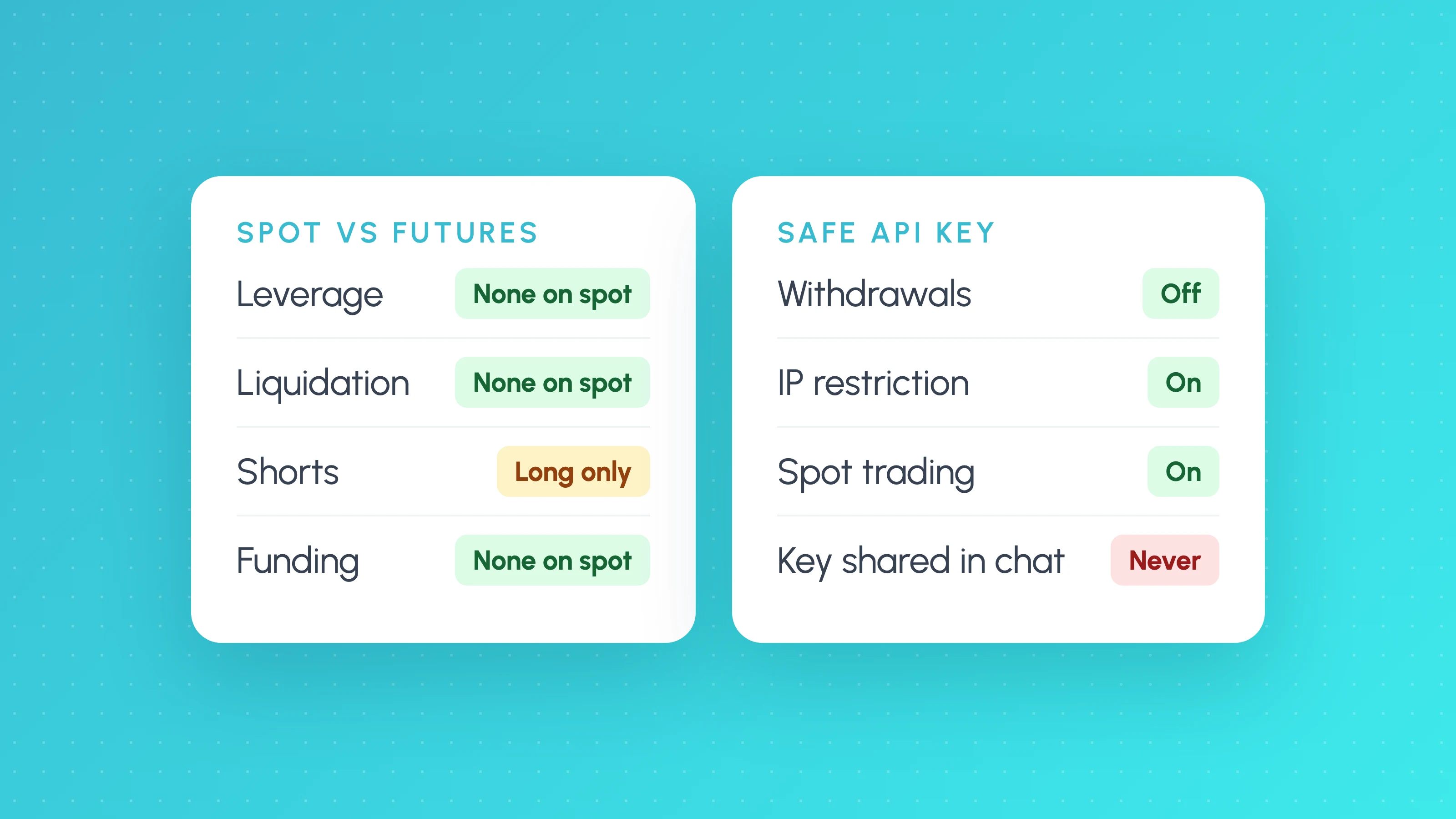
A Binance spot trading bot buys and sells coins in your Binance spot wallet automatically, without leverage. You have two routes: one of Binance's own built-in bots, such as Spot Grid, Spot DCA or Auto-Invest, or a third-party bot that trades your account through an API key with spot trading permission. Built-in bots are quick to start and run fixed recipes; API bots can run a strategy of your own, but the key needs setting up with care.
Spot is the simpler place to start with a bot. There is no leverage and no liquidation, and the worst case for any one position is the coin going to zero, not losing more than you put in. The trade-off is that a spot bot can only buy and then sell what it bought, so it makes money only when the coins it holds rise, and every buy and sell pays a fee.
Below: Binance's own spot bots, third-party and Telegram bots, spot vs futures, safe API keys and how to test a spot strategy. For leverage or shorts, read our Binance futures trading bot guide instead.
Backtests and paper results are not future results. Crypto is high risk and can fall sharply in a short time, even without leverage. The strategy, settings and risk are yours.
Binance's own spot trading bots
Binance's trading bots page lists these bots that run on spot (checked 27 November 2026):
| Bot | Level on Binance | What it does, in short | Suits | Struggles when |
|---|---|---|---|---|
| Spot Grid | Beginner | Places buy and sell orders across a price range and profits as price swings between levels | Sideways markets | Price trends out of the range |
| Spot DCA | Beginner | Spreads purchases over time to lower the average entry | Dips that bounce | Price keeps falling |
| Auto-Invest | Beginner | Buys a coin or basket on a schedule to build a position gradually | Long-term accumulation | You need an exit plan; it only buys |
| Rebalancing Bot | Beginner | Keeps a multi-coin portfolio at target weights | Holding a fixed mix | One coin trends hard against the others |
| Spot Algo (a Splitting Bot) | Advanced | Splits a large spot order into smaller pieces over time | Big orders in thinner markets | It executes an order; it does not decide when to trade |
These are recipes with settings, not strategies you design and backtest. A grid bot keeps trading its grid whether the market ranges or trends, and a DCA bot keeps buying on the way down until its budget runs out. Our guide to grid bot vs DCA bot works through both with numbers and shows where each one breaks.
Searching for a "Binance trading bot free" usually leads here. Starting a built-in bot has no separate software to pay for, but every order it places still pays Binance's normal trading fees, and a grid bot places a lot of orders. Check the bot's own terms on Binance before you start one.
Third-party Binance spot bots and Telegram bots
A third-party bot runs outside Binance and trades through an API key you create. That covers your own Python script, open-source bots, paid bot platforms, signal services and Binance trading bots on Telegram.
The upside is flexibility. An API bot can run an indicator strategy, a breakout, a mean-reversion system or anything else with clear rules, with a stop and target on each trade. The downside is trust: whatever holds the key can place orders in your account. A Telegram bot that asks you to paste your API key and secret into a chat should get the same scrutiny as any other software, and the key settings below limit the damage if something goes wrong.
When you compare third-party tools, ask:
- Does the live bot run the same rules as its backtest, with fees and slippage?
- Will it sell coins you already held? A bot that treats your whole balance as its own can sell holdings you never meant it to touch.
- Where do the stops live? A stop held only on the bot's server does nothing if that server goes down.
Spot vs futures for a bot
| Spot bot | Futures bot | |
|---|---|---|
| Leverage | None | Yes, set per position |
| Liquidation | None | Yes, if margin runs out |
| Direction | Long only: buy, then sell what you bought | Long and short |
| Funding payments | None | Paid or received on perpetuals |
| Fees | Charged in the asset you receive, or in BNB | Charged in the margin asset |
| What you can lose | Up to the value of the coins bought | Can lose the margin allocation quickly in a fast move |
| Makes money when | The coins it holds rise | Price moves in the direction of the position |
The long-only point is the one that catches people out. A strategy that earns most of its money from short trades in a falling market has nothing to do on spot during that market. On spot, a bear market means fewer trades or losing long trades, not a chance to profit from the fall. If your idea needs shorts, it belongs on futures, with the extra risks that brings.
Fees on Binance spot: coin vs BNB
Fees matter more for bots than for occasional traders, because bots trade often and each round trip pays twice.
From Binance's fee schedule (checked 27 November 2026), a regular user pays 0.100% maker and 0.100% taker on spot, or 0.075% for both when paying fees with BNB, which Binance labels 25% off. Higher VIP tiers pay less.
Binance's help centre on how spot trading fees are calculated says fees are charged in the asset you receive when you don't pay with BNB. Buy ETH with USDT and the fee comes out of the ETH; sell it and the fee comes out of the USDT. Binance's API commission FAQ says the same for API orders.
What this means for a bot:
- A round trip at 0.1% a side costs about 0.2% before slippage. A strategy averaging a 0.3% gain per trade before costs keeps only about a third of it.
- Fees in the coin shrink the position slightly. If the bot buys 1 BTC and pays the fee in BTC, it holds a little less than 1 BTC. A bot that tries to sell exactly 1 BTC will be rejected for insufficient balance, so it must sell what it actually received.
- Paying with BNB needs a BNB balance. If the balance runs out, Binance charges the full fee in the normal way, so a backtest that assumed the discount will flatter the live results.
Binance API key safety for a spot bot
From Binance's guide to creating API keys (checked 27 November 2026):
- Binance says adding an IPv4 restriction is mandatory before you can enable withdrawal permission.
- System-generated keys created since 30 January 2023 can only be given reading permission if the IP is unrestricted, and Binance strongly recommends against enabling anything beyond reading without an IP restriction.
- System-generated keys use HMAC, so you get an API key and a secret key. Self-generated keys use Ed25519 or RSA: you create the key pair and give Binance only the public key.
The safe set-up for a spot bot:
- Reading plus spot trading only. No futures, margin or other permissions the bot doesn't use.
- Withdrawals off. A trading bot never needs to move funds out of your account.
- IP restriction. Restrict the key to the bot's server IP addresses. If a provider cannot give you fixed IPs, think hard before using it.
- One key per tool. If one tool is compromised or you stop using it, delete that key and nothing else breaks.
- Never paste the secret into a chat, screenshot, shared document or a Telegram bot you have not checked.
- Fund only what the bot should trade. A sub-account holding only the bot's budget, if you can use one, caps what it can touch.
How to test a spot strategy before it trades
A spot backtest has fewer moving parts than a futures one, but the same traps.
- Test it long only. If the strategy shorts in the backtest but can only go long on spot, the backtest is measuring a different strategy. Make the rules long only, or read only the long trades.
- Include real costs. Use the fee you will actually pay (0.1% or the BNB rate, at your tier) on both sides, plus slippage. Thin altcoin pairs slip more than BTC and ETH. See slippage in algo trading.
- Get enough trades. A result built on 25 trades says little. Aim for at least 100, and test across a bull market, a bear market and a sideways stretch. See backtest sample size.
- Check an unseen period. Rules tuned on one stretch of data should be tested on a later stretch they never saw. See is my backtest overfit?
- Compare with holding. A long-only spot bot in a strong bull market should be compared with simply buying and holding. If it made less with more risk, the bot added nothing.
- Paper trade it. A paper run on live prices shows whether the live bot takes the same trades as the backtest. See how long to paper trade a strategy.
The free Monte Carlo simulator and risk of ruin calculator show what a losing streak could do at a given risk per trade.
How to run your own Binance spot bot in Tessera
1. Build and backtest it in Strategy Lab. In Strategy Lab, on the Free plan with no card, you describe the strategy in plain English to TES, Tessera's AI strategy coach, or build it from setups, filters and exits. It backtests crypto against USDT on candles from 1 minute to daily (the smallest is 5 minutes on Free and Standard), with costs included: spread, commission and slippage. Stress tests then check it on an unseen period, with Monte Carlo, price noise, higher costs and other markets. The crypto trading strategies collection has backtested strategies on USDT pairs, each with the TES prompt that rebuilds it.
2. Run it on paper. Launchpad Paper mode runs the strategy on live prices with the backtest's own costs and no Binance account needed, so you can see live signals line up with the backtest first.
3. Connect a Binance trading key. Launchpad uses a separate trading key from the read-only key the journal uses. Tessera refuses the key if withdrawals are switched on, and restricting it to Tessera's server IP is recommended. One key can trade both spot and USDⓈ-M futures, and each shows as its own Launchpad account, so you choose Binance Spot for this bot. Launchpad checks that the account lists the strategy's market before it starts. The Binance page has the full set-up.
4. Choose Copilot or Autopilot.
- Copilot: every signal arrives as a notification with a chart of the trade, in Telegram or the app, and nothing is sent to Binance until you approve it. Signals expire after a set number of candles, so a late approval doesn't enter a stale trade. This is a Binance trading bot on Telegram that never trades without your tap.
- Autopilot: the bot trades for you, on every paid plan. Within seconds of each candle closing it checks the strategy's rules; when a setup appears it sizes the trade by your risk settings (% risk per trade, 0.5% by default and capped at 5%, maximum size, daily loss limit, maximum trades and trading hours) and sends it with its stop and target. Every order is checked against those limits when the signal fires and again right before it is sent.
How Launchpad handles spot specifically:
- Long only, no leverage. Pairs are coins against USDT or USDC. If the strategy also shorts, only its long trades run, so live results will differ from a backtest that included shorts.
- It only sells what its bot bought. Tessera never sells coins you already held in the wallet.
- Stop and target sit at Binance. Each entry's stop loss and take profit are placed as an OCO order at Binance, so one cancels the other and both still work if Tessera is down.
- Trades sync to the journal, next to the backtest, so you can see whether the bot is doing what the test said.
Live trading with Launchpad is on paid plans from $39 a month (the Free plan includes a 7-day paper run), and it runs rule-based strategies with a stop and target, not grid or DCA bots. You can get started for free in Strategy Lab and upgrade when a strategy is worth running.
Frequently asked questions
- Does Binance have a spot trading bot?
- Yes. As of 27 November 2026, Binance lists Spot Grid, Spot DCA, Auto-Invest and the Rebalancing Bot as beginner bots, plus Spot Algo among its Splitting Bots for breaking up large orders. They run fixed recipes with your settings rather than strategies you design and backtest yourself.
- Can a Binance spot bot short?
- No. On spot a bot can only buy a coin and later sell it. To profit from falling prices you need futures; see our Binance futures trading bot guide. In Tessera's Launchpad, a strategy with short trades runs only its long trades on Binance Spot.
- What API permissions does a Binance spot bot need?
- Reading and spot trading, nothing else. Leave withdrawals off and restrict the key to the bot's server IP addresses. Binance only allows permissions beyond reading on system-generated keys that have an IP restriction.
- Is there a Binance trading bot for Telegram?
- Many third-party bots work through Telegram. With Tessera's Copilot mode, each signal from your own backtested strategy arrives on Telegram or in the app with a chart, and the order is only placed on Binance once you approve it.
- What is the best Binance bot for beginners?
- The one whose rules you understand and have tested. Binance's beginner bots are easy to start but still need a plan for trends that break the range or dips that keep falling. If you want to run your own rules, backtest them with fees in Strategy Lab and run them on paper before any money goes in.
Backtested strategies that held up
Each one was searched from hundreds of variants, then tested once on a locked final year it was never tuned on. Full rules, every trade and a free prompt to rebuild it.
- ETHUSDT
+1,893.2%
Sep 2019 to Nov 2026
Profit factor
1.39
Win rate
35.2%
Max DD
−18.9%
Breakout · 4 hours
ETHUSDT 4h Bollinger band breakout
Enter when the candle closes above the upper Bollinger band(30, 2) for longs, below the lower band for shorts, with the 200 EMA trend. ETHUSDT 4-hour candles, long and short, 3R target.
See the rules and results - EURUSD
+1,339.5%
Nov 2006 to Nov 2026
Profit factor
1.66
Win rate
53.0%
Max DD
−16.0%
Momentum · Daily
EURUSD daily CCI cross
Enter when CCI(14) crosses above -100 for longs, below 100 for shorts. EURUSD daily candles, long and short, 1.5R target.
See the rules and results - ADAUSDT
+937.9%
Sep 2019 to Nov 2026
Profit factor
1.50
Win rate
34.5%
Max DD
−15.0%
Breakout · 4 hours
ADAUSDT 4h Bollinger band breakout
Enter when the candle closes above the upper Bollinger band(20, 2) for longs, below the lower band for shorts, with the 200 EMA trend. ADAUSDT 4-hour candles, long and short, 3R target.
See the rules and results
Keep reading
Binance Futures Trading Bot: Built-in Bots, API Bots and Safe Key Settings (2026)
A Binance futures trading bot is one of Binance's own grid or DCA bots or an API bot. How each works, safe API key settings, and how to test a strategy first.
Grid Bot vs DCA Bot: How Each Works, When It Fails, and Are Grid Bots Profitable?
Grid bot vs DCA bot: a grid bot profits from price swinging in a range, a DCA bot averages into dips. Worked examples, when each fails, and the risks to check.
 Algo trading
How to Create a Trading Bot Without Coding (and Test It Before It Trades)
How to create a trading bot without coding: compare visual builders, AI builders and TradingView webhooks, then test it with this checklist before it trades.