

No-Code Algo Trading Platform: Build, Backtest and Run Strategies Without Code (2026)
What a no-code algo trading platform does, what to look for, how the main types compare, and how to build, backtest and run a strategy without code in 2026.
By Hristo Skulev · Updated · 10 min read
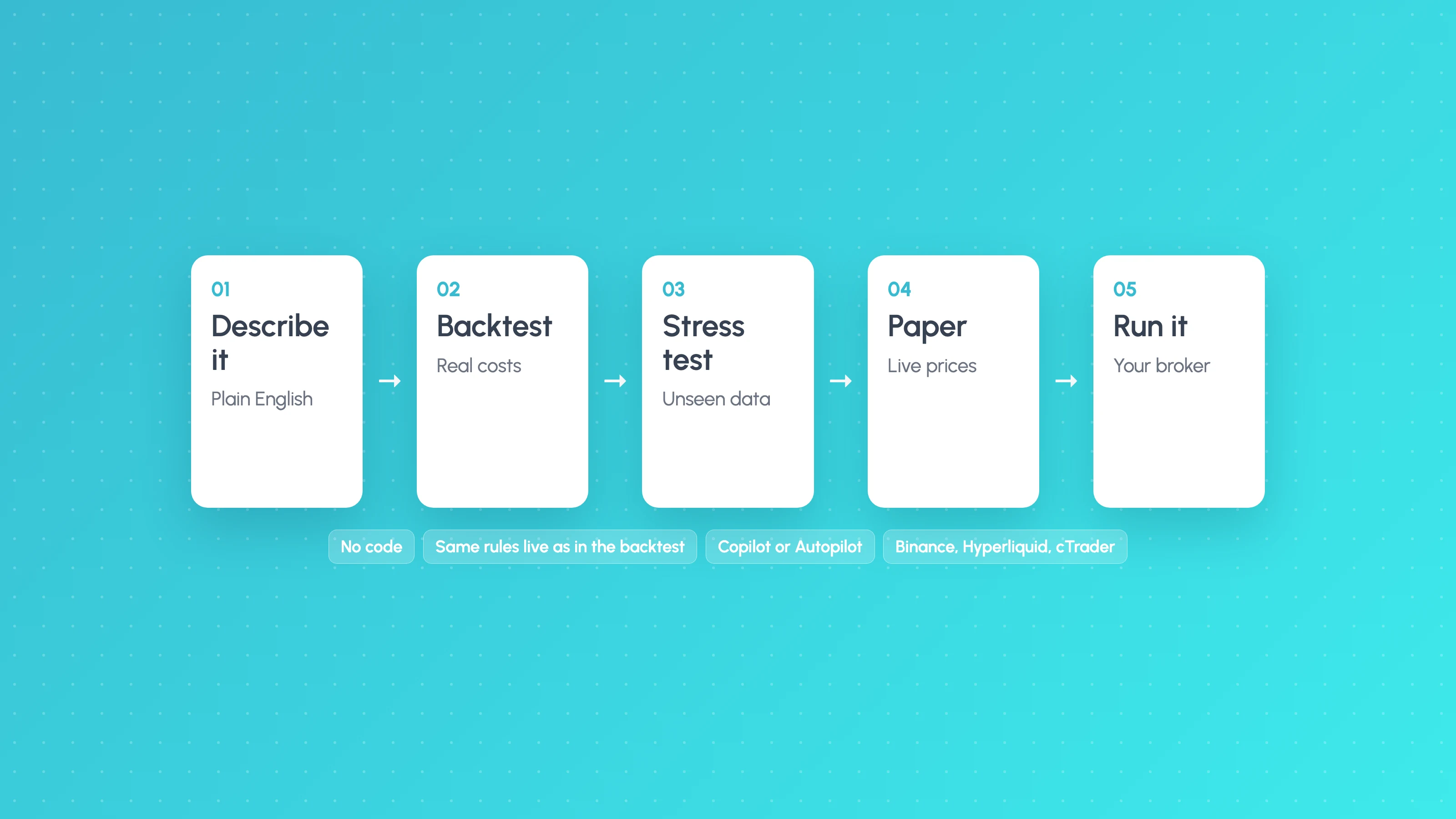
A no-code algo trading platform lets you turn a trading idea into exact rules, backtest those rules on historical data, check that the result is not luck, and then run the same rules as a bot on a broker or exchange, all without writing code. You build from menus, blocks or a plain-English description instead of Python, Pine Script or MQL5.
The best no-code algo trading platform for you is the one that does all four jobs with the same rules from start to finish, includes real trading costs in its backtest, can trade where you already trade, and lets you set hard risk limits. Many tools only cover part of the chain: some build and test but cannot trade, some trade but cannot test, and some need code after all.
This guide explains what a full platform does, what to look for, how the main types compare as of November 2026, and how Tessera does it end to end. If you only want to compare backtesters, see our guide to the best no-code backtesting software. This page is about the whole route: build, test and run.
Backtests and paper results are not future results. Leveraged forex, CFDs and crypto are high risk, and you can lose more than you expect. The strategy, its settings and the risk you take are yours.
What a no-code algo trading platform does
A complete platform covers four steps. If one is missing, you end up stitching tools together, and every join is a place where the live bot can drift from what you tested.
- Build the rules. Entry, filters, stop, target, position size, sessions and the maximum number of trades, with nothing left to judgement.
- Backtest. Run the rules over years of candles, with spread, commission, slippage and swap.
- Validate. Check the result on data it was not built on, shuffle the trade order, add noise and extra costs, and try other markets. This is what separates an edge from a well-fitted accident. See how to stress test a trading strategy.
- Run it live. Paper trade first, then send real orders to a broker or exchange, with limits that stop the bot on a bad day.
What to look for
| What to check | Why it matters |
|---|---|
| Same code live as in the backtest | If the live engine is a separate translation, your backtest tested something else |
| Real costs in every backtest | Spread, commission, slippage and swap can turn a small edge into a loss |
| Validation tests | An unseen period, Monte Carlo and cost stress show whether the result survives |
| Which brokers it can trade | A good builder is no use if it cannot place orders where your account is |
| Risk controls | % risk per trade, maximum size, daily loss limit, maximum trades and trading hours |
| Approve-each-trade option | Lets you watch the bot decide before you hand it full control |
| Data history and candle size | A 1-minute strategy needs 1-minute data, over more than one market regime |
| Pricing | A free tier to test ideas, and a clear price for running bots live |
The first row and the approve-each-trade mode carry the most weight: approving live signals yourself for a few weeks is the cheapest way to see whether the bot behaves as tested.
The main types of algo trading platform compared
"Algo trading platform" covers very different products. The table groups them by type, with a well-known example where we could confirm the facts on the vendor's own pages on 27 November 2026. Prices and features change often, so check before you pay.
| Type | How you build | Backtest and validation | How it trades | Example |
|---|---|---|---|---|
| Visual or AI strategy builder | Menus, blocks or plain English | Built in; validation depth varies a lot | Its own bot engine on supported brokers, or an export | Tessera Strategy Lab and Launchpad; see our backtester comparison for others |
| Webhook router | You build elsewhere, usually as alerts on a charting platform | None of its own; you rely on the source's tester | Receives alerts and forwards orders to a connected broker | TradersPost |
| Exchange bot platform | Pick a bot type (DCA, grid, signal) and fill in settings | Limited; depends on the bot type | Runs on crypto exchanges through API keys | 3Commas |
| Coded quant platform | You write the algorithm in code | Full backtesting engine | Live trading on supported brokers, on paid tiers | QuantConnect |
Webhook routers. TradersPost takes alerts from a charting tool and places the orders at your broker. TrendSpider's help centre describes the setup: TradersPost turns the alerts into signals and sends them to the connected broker (TrendSpider help: connection with TradersPost). Execution is no-code, but the strategy and its testing live in a separate tool, and the alert, router and broker each add a point of failure, as covered in how to automate a trading strategy.
Exchange bot platforms. 3Commas is a crypto automation platform with DCA, signal and grid bots, a smart trade terminal, and a signal bot that turns TradingView webhook alerts into orders. Its homepage names Binance, Hyperliquid, Bybit, OKX, Bitget, Gate, Kraken, KuCoin and Coinbase among its exchanges (3Commas). Its pricing page lists Starter, Pro and Expert plans with a free trial rather than a permanent free plan (3Commas pricing). These bots are templates you configure, not strategies you design and validate rule by rule.
Coded quant platforms. QuantConnect is a full research and backtesting platform where you write the algorithm yourself; its documentation shows examples in Python with C# versions (QuantConnect docs). Its Free plan includes unlimited backtesting but no paper or live trading node; paper and live trading start on the paid Quant Researcher tier, with brokers including Interactive Brokers, Alpaca, Binance and Kraken (QuantConnect pricing). It is powerful, but it is not no-code.
The best algo trading platform for beginners with no coding experience
If you have never automated a strategy, pick a platform that keeps everything in one place and makes it hard to skip a step. It should read your rules back in plain English, include costs and an unseen test by default, offer a free tier and a paper mode with live prices, let you approve each trade before full automation, and require a daily loss limit before going live.
Start with one simple strategy on one market. Paper trade it until its live trades match the backtest's trades on the same days, then go live small. Our guide to algo trading for beginners walks through the whole process, and how to create a trading bot without coding has a checklist to run before any bot trades.
Algo trading platform for forex
For forex, the question is which platform your broker account runs on, because a no-code tool can only trade the platforms it connects to.
On Tessera, forex bots run on cTrader and Liquid Brokers, on demo or live accounts. On cTrader, Launchpad trades whatever your broker's cTrader account lists, usually forex, gold and silver. Liquid Brokers connects with your Liquid Charts login. Launchpad does not run on MetaTrader, OANDA, TradeLocker, Match-Trader or DXtrade. For the full route, see the forex trading bot without coding guide, and browse backtested forex strategies for ideas.
Algo trading platform for crypto
For crypto, the choice is usually between a centralised exchange and an on-chain venue, and between spot and perpetual futures.
- Binance: Launchpad trades USDⓈ-M futures, in One-way or Hedge mode, and spot against USDT or USDC. Spot is long only with no leverage, and Tessera only sells coins its own bot bought. Withdrawals must be off on the trading key or it is refused. Gold, silver and some US stock and ETF perps also trade once Binance's TradFi-Perps agreement is signed. See the Binance futures trading bot guide.
- Hyperliquid: perps only, on crypto plus gold, silver, US stocks and indices on trade.xyz. You sign two wallet approvals, your private key is never shared, and the trading agent cannot withdraw. See the Hyperliquid trading bot guide.
The crypto strategy collection has backtested strategies on USDT pairs you can rebuild and run.
How Tessera does it end to end
Tessera splits the job into two products that share the same rules: Strategy Lab to build and test, and Launchpad to run.
Build in Strategy Lab
Describe the strategy in plain English to TES, the AI strategy coach, for example "buy gold on a 15-minute pullback to the 50 EMA in an uptrend, stop below the swing low, target 2R". TES builds the rules and runs the backtest. Or build it yourself from setups, filters and exits. Either way, you see the rules before the results.
Strategy Lab backtests on 1-minute to daily candles on every plan, Free included. Plans differ in how far back the data goes: Free covers 1 year on 15-minute and 5 years on daily, Standard 20 years on daily, and Plus and Pro all available data.
Markets are forex, spot gold and silver, US stocks, US ETFs (including QQQ, SPY, DIA and IWM for the indices, and USO for oil) and crypto against USDT. Strategy Lab does not test futures or index CFDs; TES offers the matching ETF instead.
Stress test it
Each strategy can be put through an unseen period, Monte Carlo, price noise, trading costs (spread, commission, slippage and swap), other markets and prop-firm rules, so you find out here if it only works on the data it was built on.
Or start from the strategy library
The strategy library holds about 130 backtested strategies with full rules, every trade and the TES prompt to rebuild each one. They came out of 344,081 variants backtested, and the strategies kept had to stay profitable on a locked final 12 months. Those are hypothetical backtest results, not a promise of future returns.
Run it on Launchpad
Launchpad runs Strategy Lab strategies with the same code as the backtest, on Binance, Hyperliquid, cTrader or Liquid Brokers. Before launch it checks that your account lists the strategy's market. There are three modes:
- Paper: live prices and the backtest's own costs, with no broker connected.
- Copilot: every signal arrives as a notification with a chart, and nothing is sent until you approve it in Telegram or the app. Signals expire after a set number of candles.
- Autopilot: within seconds of each candle closing, Launchpad checks the rules, sizes the trade by your risk settings and sends it with its stop and target. You set % risk per trade (0.5% by default, capped at 5%), maximum size, a daily loss limit, maximum trades and trading hours, and every order is checked against them when the signal fires and again right before it is sent.
Stop loss and take profit are attached at the broker with each entry, and bot trades sync back to the trading journal next to the backtest. Launchpad cannot be started from TradingView alerts, and alerts come by Telegram and in the app, not email.
What the Free plan includes
The Free plan needs no card. It includes Strategy Lab with 15 backtests a week and 5 TES prompts a week, plus one 7-day Launchpad paper run with no trade limit. Live trading, Copilot and Autopilot are on paid plans: Standard at $39 a month with 5 strategy slots, Plus at $99 with 15 and Pro at $249 with 40. Each slot can run live or on paper, and extra slots are $9 a month. Pine Script v6 export is on paid plans. Details are on the pricing page.
Where Tessera is the wrong choice: if your account is on MetaTrader, Interactive Brokers, Bybit or Alpaca, if you trade options or exchange-traded futures such as CME contracts, or if you want to write the algorithm in code yourself.
Frequently asked questions
- What is the best no-code algo trading platform?
- The best one is the one that builds, backtests, validates and runs your strategy with the same rules throughout, includes real costs, trades on your broker or exchange, and lets you set hard risk limits. Check those before comparing features or price.
- Which algorithmic trading platform is best for beginners with no coding experience?
- Pick one that reads your rules back in plain English, includes costs and an unseen test by default, has a free tier and a paper mode, and lets you approve each trade before full automation. Start with one strategy on one market, and read algo trading for beginners first.
- Is no-code automated trading safe?
- It is as safe as the rules and limits you set. Paper trade first, risk a small percentage per trade, set a daily loss limit, and never give a bot withdrawal permission on an exchange or broker account. A bot runs your rules consistently; it does not make a losing strategy profitable.
- Can I use one no-code platform for forex and crypto?
- Yes, if it connects to both kinds of venue. Tessera's Launchpad trades forex on cTrader and Liquid Brokers, and crypto on Binance and Hyperliquid, using strategies built and tested in the same Strategy Lab.
- How much does a no-code algo trading platform cost?
- It varies from free tiers to hundreds of dollars a month. Tessera's Free plan includes 15 backtests a week and a 7-day paper run; live bots start on Standard at $39 a month. Always check what the free tier leaves out, especially live trading.
Backtested strategies that held up
Each one was searched from hundreds of variants, then tested once on a locked final year it was never tuned on. Full rules, every trade and a free prompt to rebuild it.
- ETHUSDT
+1,893.2%
Sep 2019 to Nov 2026
Profit factor
1.39
Win rate
35.2%
Max DD
−18.9%
Breakout · 4 hours
ETHUSDT 4h Bollinger band breakout
Enter when the candle closes above the upper Bollinger band(30, 2) for longs, below the lower band for shorts, with the 200 EMA trend. ETHUSDT 4-hour candles, long and short, 3R target.
See the rules and results - EURUSD
+1,339.5%
Nov 2006 to Nov 2026
Profit factor
1.66
Win rate
53.0%
Max DD
−16.0%
Momentum · Daily
EURUSD daily CCI cross
Enter when CCI(14) crosses above -100 for longs, below 100 for shorts. EURUSD daily candles, long and short, 1.5R target.
See the rules and results - ADAUSDT
+937.9%
Sep 2019 to Nov 2026
Profit factor
1.50
Win rate
34.5%
Max DD
−15.0%
Breakout · 4 hours
ADAUSDT 4h Bollinger band breakout
Enter when the candle closes above the upper Bollinger band(20, 2) for longs, below the lower band for shorts, with the 200 EMA trend. ADAUSDT 4-hour candles, long and short, 3R target.
See the rules and results
Keep reading
 Algo trading
Algo Trading for Beginners: A Step-by-Step Roadmap (2026)
Algo trading for beginners: what it is, what you need, a step-by-step roadmap from first strategy to live bot, whether you need to code, and the mistakes to avoid.
 Algo trading
How to Create a Trading Bot Without Coding (and Test It Before It Trades)
How to create a trading bot without coding: compare visual builders, AI builders and TradingView webhooks, then test it with this checklist before it trades.
 Algo trading
How to Automate Your Trading Strategy (Without Coding)
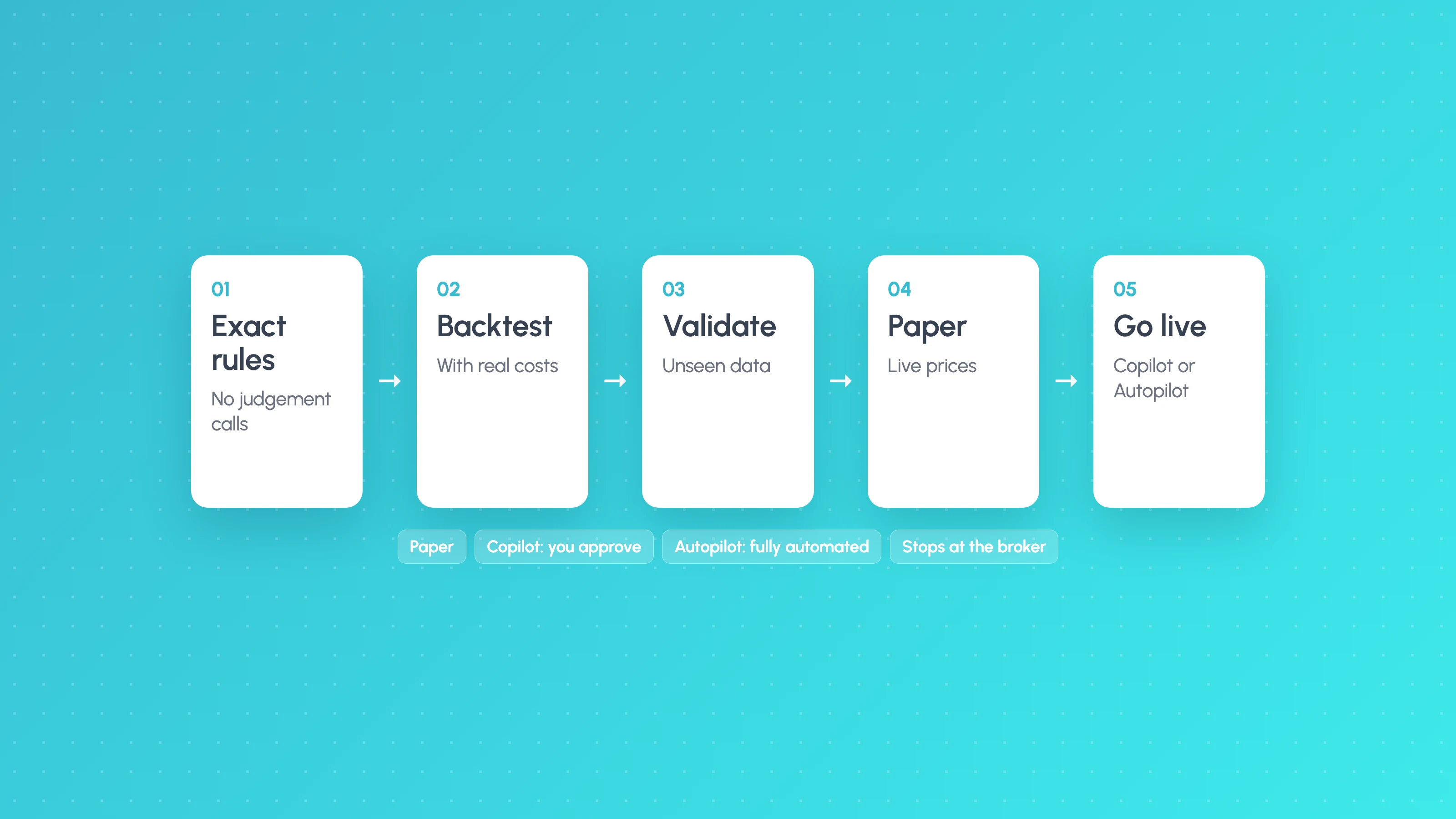
How to automate a trading strategy without coding: write exact rules, backtest with costs, paper trade, choose how orders reach your broker, then go live.