

Forex Trading Bot Without Coding: Build, Backtest and Run One (2026)
How to build a forex trading bot without coding: the routes, the forex-specific tests (spread, swap, sessions, news) and paper trading it before live money.
By Hristo Skulev · Updated · 10 min read
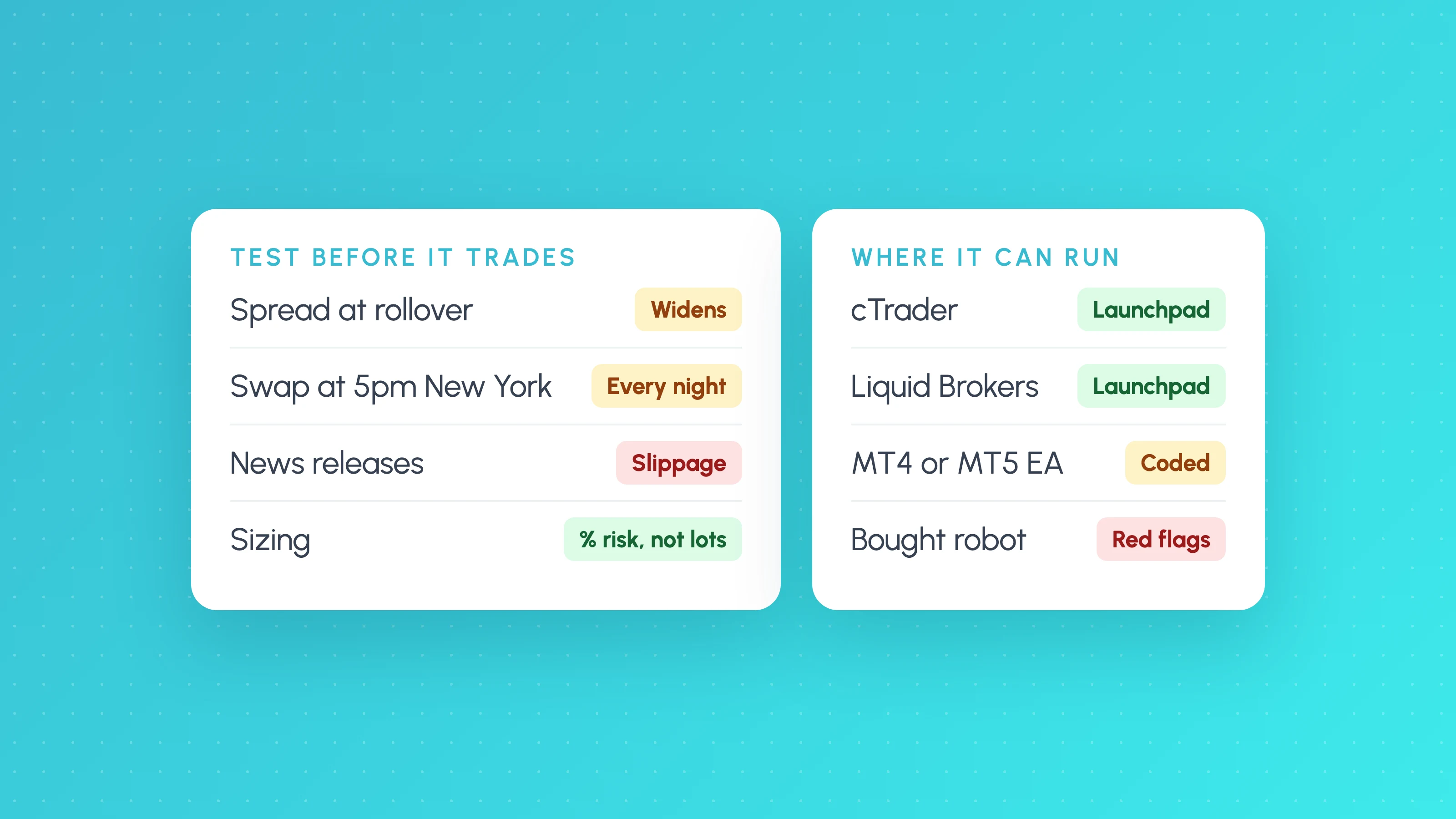
You can build a forex trading bot without coding by describing your rules in a no-code or AI strategy builder, backtesting them on the currency pairs you trade with realistic spread, commission and swap, then running the bot on paper before you connect a broker account. The bot itself is the easy part. What decides whether it survives live trading is the forex-specific testing: spreads that widen at rollover and around news, overnight swap, the session the strategy depends on, and position sizes set in percent risk rather than lots.
There are three common routes to an automated forex trading bot: a MetaTrader Expert Advisor (EA), a cTrader cBot, or a no-code platform that builds and runs the strategy for you. This guide covers what a forex bot can and cannot do, the tests that matter for currencies, each route, and how to do it with Tessera.
A bot runs your rules consistently. It does not turn a losing strategy into a winning one. Backtests and paper results are not future results, leveraged forex and CFDs are high risk, and the strategy, settings and risk are yours.
What a forex trading bot is (and what it is not)
A forex trading bot is software that watches prices on currency pairs, checks them against a fixed set of rules, and places, manages and closes trades for you. "Buy EURUSD when the 20 EMA crosses above the 50 EMA during the London session, stop below the last swing low, target 2R" is a strategy a bot can run. The bot removes hesitation and missed signals. It does not add an edge the rules do not already have.
What a forex bot is not:
- A guaranteed income. No bot can promise profits. Markets change, and a rule set that worked over the last three years can stop working.
- A substitute for testing. A bot executes whatever you give it, including a strategy that only looked good because the backtest ignored costs.
- Something to run without limits. Leverage means a bot with no daily loss limit or position cap can do serious damage quickly.
Red flags on "forex robot" sales pages
Ready-made "forex robots" are sold widely, and many sales pages follow the same pattern. The US Commodity Futures Trading Commission warned in January 2024 that AI cannot predict the future and that promises of high or guaranteed returns from trading bots are red flags of fraud. Treat these as warning signs:
- guaranteed or "consistent" monthly returns, or very high win rates presented as normal;
- only a backtest or a screenshot, with no costs shown and no live record you can verify;
- results that start after the losing period, or a curve with no drawdowns at all;
- no explanation of the rules, just "AI" or a "secret algorithm";
- pressure to buy now, limited licences, or a recommended broker you must sign up with;
- a requirement to hand over your account login or money to someone else to "manage" it.
A bot you build yourself has one big advantage: you know every rule, so you can test every rule.
Forex-specific things a backtest must handle
Most bots that look good in a backtest and disappoint live fail on things that are particular to currencies. Check each one before a single live trade.
| Issue | What happens live | How to test for it |
|---|---|---|
| Spread widening | Spreads are wider at rollover, in thin hours and around news, so stops and entries fill worse | Backtest with a spread above your broker's typical figure, then raise it again in a cost stress test |
| Swap (rollover) | Positions held past the daily rollover are charged or paid swap, more over weekends | Include swap in the backtest, especially for strategies that hold overnight |
| Sessions and liquidity | A breakout that works at the London open may do nothing in the Asian session | Restrict the strategy to its session and check results by hour and session |
| News | Big releases can gap price through a stop | Look at the worst trades; decide whether to filter around scheduled news |
| Leverage and sizing | Fixed lots mean risk changes with the stop distance and the pair | Size every trade as a percent of the account, set by the stop |
Spread and slippage
A strategy that takes 20 trades a week on a 5-minute chart can lose its whole edge to half a pip of extra spread. Backtest with the spread and commission your broker actually charges, then check what happens when costs rise. Our guide to slippage in algo trading shows how much small cost changes can matter.
Swap and the 5pm New York rollover
Forex brokers apply rollover at 5pm New York time; FXCM's help centre, for example, states its rollover is for the 5pm ET debit or credit and that the weekend rollover is accounted for on Wednesday, as of November 2026. Rates and the exact day vary by broker and instrument, so check yours. Two practical effects for a bot: a swing strategy that holds for days pays (or earns) swap that a backtest without swap ignores, and spreads around rollover are often wide enough to trigger tight stops.
Sessions, liquidity and news
Currency pairs trade around the clock on weekdays, but liquidity does not. Many forex strategies only make sense in one session: an opening range breakout at the London open, or a trend strategy during the London and New York overlap. Give the bot trading hours, and check the backtest by session and hour so you know where the results actually come from.
Leverage and position sizing in percent risk
Leverage lets a small account control a large position, which is exactly why sizing matters. Set risk per trade as a percentage of the account, for example 0.5% or 1%, and let the bot work out the lot size from the stop distance. A fixed lot size means a 40-pip stop risks twice as much as a 20-pip stop, and EURUSD risk differs from GBPJPY risk. Size from the strategy's worst losing streak in the backtest, not its average.
The three routes to a forex bot
| Route | Coding needed | Where it runs | Main thing to watch |
|---|---|---|---|
| MetaTrader EA (coded) | Yes, MQL4 or MQL5 | Your PC, a VPS or a hosted service | Building, testing and maintaining the code yourself |
| MetaTrader EA (bought) | No | Your PC, a VPS or a hosted service | You often cannot see the rules; see the red flags above |
| cTrader cBot | Yes, C# or Python, or a third-party builder | Your PC, a VPS or cTrader's cloud | Same as a coded EA: testing and monitoring are on you |
| No-code platform | No | The platform's servers, sending orders to a supported broker | Which brokers it supports, and whether live uses the same code as the backtest |
MetaTrader Expert Advisors
MetaTrader 4 and 5 are the most widely offered forex platforms, and their bots are called Expert Advisors. You can code one in MQL4 or MQL5, have one coded for you, or buy one. A coded EA gives you full control, but the strategy, the risk controls, hosting and monitoring are all yours to build. A bought EA is quick to install but often protected, so you cannot see what it does, which makes it hard to know why it wins or loses. See our list of forex prop firms that allow EAs if you trade a funded account.
cTrader cBots
cTrader is offered by many forex and CFD brokers, and its bots, called cBots, are written in C# or Python. Some third-party builders generate cBots without code. Our guide to building a cTrader bot without coding covers that route in detail.
No-code platforms
A no-code platform lets you define the strategy in menus or plain English, backtests it, then runs it and sends orders to your broker account. You do not install anything on the trading platform. The questions to ask are which brokers it can trade on, whether the backtest includes realistic forex costs, and whether the live bot runs the same logic as the backtest. Our wider guide on how to create a trading bot without coding compares no-code builders, AI builders and webhook setups.
How to build and run a forex bot with Tessera
Tessera is a no-code platform. You build and test the strategy in Strategy Lab, then run it with Launchpad. Here is the route step by step.
Step 1: Build the strategy in Strategy Lab
Strategy Lab is on every plan, including Free with no card. Describe your strategy in plain English to TES, the AI strategy coach, or build it from setups, filters and exits. Strategy Lab backtests forex pairs, plus spot gold (XAUUSD) and silver (XAGUSD), on candles from 1 minute to daily (the Free and Standard plans start at 5 minutes; Plus and Pro go down to 1 minute), with up to 20 years of daily history.
If you want a starting point, the backtested forex trading strategies in our library show full rules, every trade and the TES prompt to rebuild each one.
Step 2: Backtest with your broker's costs
Set spread, commission, slippage and swap to match your account. For a forex bot, swap is the one people forget, and it matters for anything that holds past 5pm New York.
Step 3: Stress test it
Run the stress tests before you trust the result: an unseen period the strategy was not tuned on, a Monte Carlo test, price noise, higher costs, other markets, and prop-firm rules if you trade a funded account. A forex strategy that only works on one pair over one period, or falls apart when spread rises a little, is better caught here. Our guide to stress testing a trading strategy explains what each test tells you.
Step 4: Paper trade it
The Free plan includes one 7-day paper run with no trade limit; live trading, Copilot and Autopilot are on the paid plans: Standard ($39 a month), Plus ($99) and Pro ($249). Start in Paper mode, which uses live prices and the backtest's own costs with no broker account needed. The point is to confirm that the live bot takes the same trades the backtest says it would. How long to stay on paper depends on how often the strategy trades; see how long to paper trade a strategy.
Step 5: Connect cTrader or Liquid Brokers, then Copilot or Autopilot
For forex bots, Launchpad runs on two venues:
- cTrader. Sign in with cTrader and allow trading access, on a demo or live account. Launchpad trades whatever your broker's cTrader account lists, usually forex, gold and silver. See cTrader.
- Liquid Brokers. Connect with your Liquid Charts login; one login covers all its accounts. See Liquid Brokers.
Launchpad checks that the account lists the strategy's market before it launches. Then choose a mode:
- Copilot: every signal arrives as a notification with a chart in Telegram or the app, and nothing is sent until you approve it. Signals expire after a set number of candles, so a late approval does not chase an old setup.
- Autopilot: the bot trades for you, on every paid plan. Within seconds of each candle closing it checks the strategy's rules; when a setup appears it sizes the trade by your risk settings (% risk per trade, 0.5% by default and capped at 5%, maximum size, daily loss limit, maximum trades and trading hours) and sends it with its stop and target. Every order is checked against those limits when the signal fires and again right before it is sent.
Stop loss and take profit are attached at the broker with each entry, and every bot trade syncs back to your journal so you can compare live fills with the backtest.
What Launchpad does not support
To be plain about it: Launchpad cannot run bots on MetaTrader 4 or 5, or on OANDA. If your forex account is on either, Strategy Lab can still build and test the strategy, but Launchpad cannot place the trades there. Launchpad also cannot start bots from TradingView alerts, and alerts come by Telegram and in-app only, not email.
Frequently asked questions
- Can I make a forex trading bot without coding?
- Yes. Some third-party tools generate MetaTrader EAs or cTrader cBots from menus, and platforms such as Tessera build, backtest and run the strategy themselves, sending orders to a supported broker. Whichever route you take, test with realistic costs and paper trade before live money.
- Do forex trading bots actually work?
- A bot works if the strategy it runs has an edge after costs, and if it is sized and limited sensibly. The bot itself only executes rules. Be very sceptical of any forex robot sold with promises of guaranteed returns; the CFTC lists that as a red flag of fraud.
- Is a forex bot good for beginners?
- It can be, because writing rules down forces clarity and removes impulsive trades. Start with one simple strategy on one or two major pairs, small risk per trade, and a long paper and demo period before any live money.
- Can Tessera run a bot on MetaTrader or OANDA?
- No. Launchpad runs forex bots on cTrader and Liquid Brokers accounts. You can still build and backtest a strategy in Strategy Lab for any forex pair it supports, but Launchpad cannot place trades on MetaTrader or OANDA.
- What is an AI forex bot?
- Usually it means a bot built with help from AI, for example describing a strategy in words and having the AI turn it into rules. In Tessera, TES does this in Strategy Lab and proposes each change for you to confirm. The AI does not predict prices; the bot still runs fixed rules that you should test like any other strategy.
Backtested strategies that held up
Each one was searched from hundreds of variants, then tested once on a locked final year it was never tuned on. Full rules, every trade and a free prompt to rebuild it.
- ETHUSDT
+1,893.2%
Sep 2019 to Nov 2026
Profit factor
1.39
Win rate
35.2%
Max DD
−18.9%
Breakout · 4 hours
ETHUSDT 4h Bollinger band breakout
Enter when the candle closes above the upper Bollinger band(30, 2) for longs, below the lower band for shorts, with the 200 EMA trend. ETHUSDT 4-hour candles, long and short, 3R target.
See the rules and results - EURUSD
+1,339.5%
Nov 2006 to Nov 2026
Profit factor
1.66
Win rate
53.0%
Max DD
−16.0%
Momentum · Daily
EURUSD daily CCI cross
Enter when CCI(14) crosses above -100 for longs, below 100 for shorts. EURUSD daily candles, long and short, 1.5R target.
See the rules and results - ADAUSDT
+937.9%
Sep 2019 to Nov 2026
Profit factor
1.50
Win rate
34.5%
Max DD
−15.0%
Breakout · 4 hours
ADAUSDT 4h Bollinger band breakout
Enter when the candle closes above the upper Bollinger band(20, 2) for longs, below the lower band for shorts, with the 200 EMA trend. ADAUSDT 4-hour candles, long and short, 3R target.
See the rules and results
Keep reading
 Algo trading
How to Create a Trading Bot Without Coding (and Test It Before It Trades)
How to create a trading bot without coding: compare visual builders, AI builders and TradingView webhooks, then test it with this checklist before it trades.
 Algo trading
How to Build a cTrader Trading Bot Without Coding
Build a cTrader trading bot without coding: what cTrader Algo and cBots need, then a no-code route from strategy to backtest, demo account and live trading.
 TradingView backtests
How to Stress Test a Trading Strategy: 6 Tests Before You Go Live
How to stress test a trading strategy before going live: six robustness tests, what each one catches and a pass or fail rule of thumb, with worked examples.