

Pine Script Session, Time and Day of Week Filters (v6)
Copy-paste Pine Script v6 session, time-of-day and day of week filters, with time zone and DST handling, exits outside the filter and an overfitting check.
By Tessera Trades · Updated · 10 min read
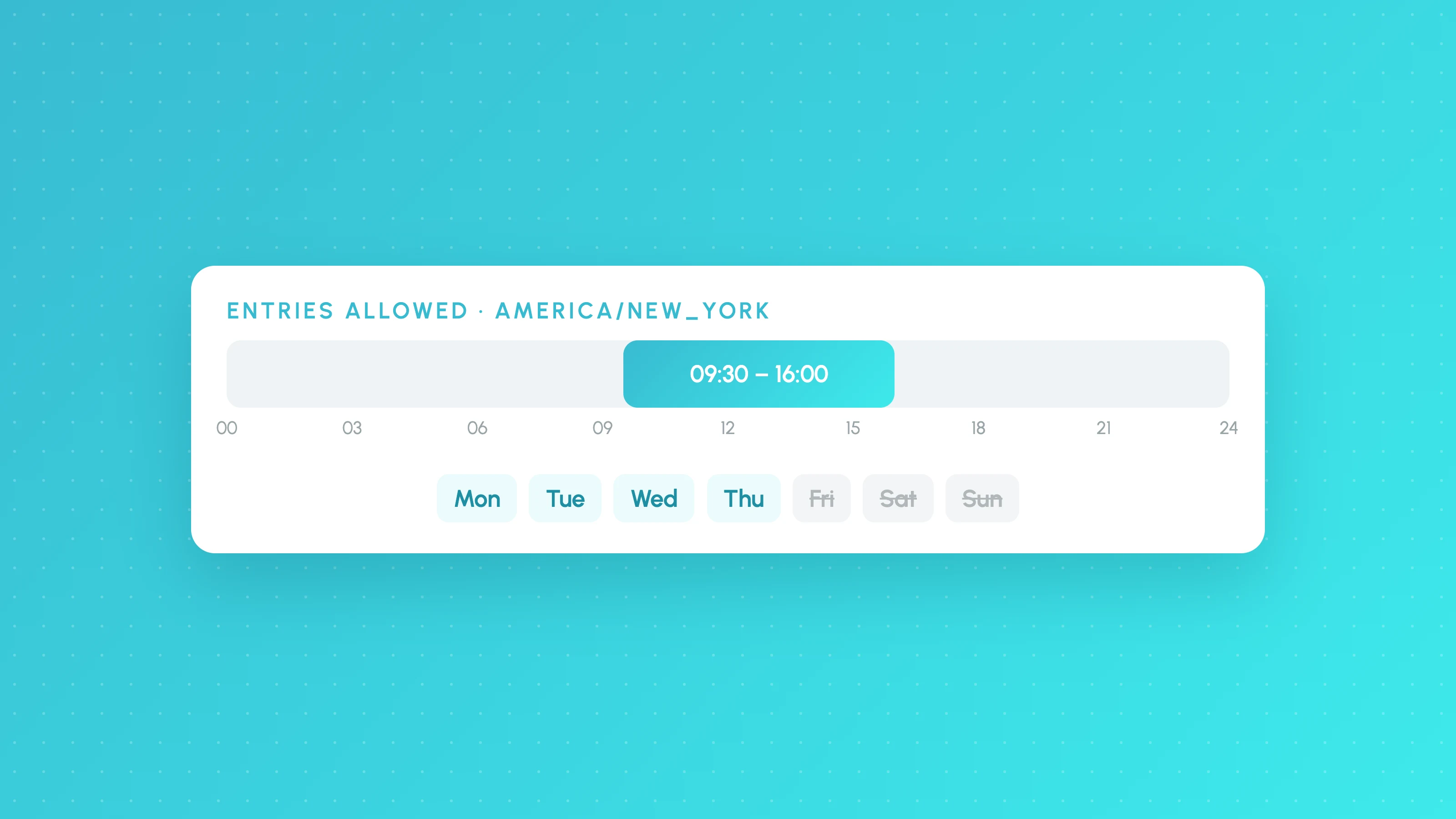
To filter a Pine Script strategy by session, test whether the bar is inside a session with not na(time(timeframe.period, "0930-1600", "America/New_York")) and only allow entries when that is true. The time() function returns na for bars outside the session, and passing an IANA time zone such as "America/New_York" keeps the window correct through daylight saving changes.
Most results for this search are community scripts with code and little explanation. This guide gives short Pine Script v6 snippets for session, time-of-day and day of week filters, explains the time zone and order-timing details that quietly break them, and ends with a way to check that a filter is a real improvement rather than a fit to past data.
A basic session filter
//@version=6
strategy("Session filter example", overlay = true)

sessionInput = input.session("0930-1600", "Entry session")
tzInput      = input.string("America/New_York", "Session time zone")

inSession = not na(time(timeframe.period, sessionInput, tzInput))

fastMa     = ta.sma(close, 20)
slowMa     = ta.sma(close, 50)
longSignal = ta.crossover(fastMa, slowMa)

if longSignal and inSession
    strategy.entry("Long", strategy.long)

strategy.exit("Exit", "Long", loss = 200, profit = 400)
How it works, per TradingView's Sessions and Time documentation:
time(timeframe, session, timezone)returns the bar's opening time if it falls insidesession, andnaif it doesn't.timeframe.period(or an empty string) means the chart's timeframe.- The
timezoneargument says which time zone the session string is written in. If you leave it out, the session is read in the exchange's time zone. input.session()puts the session in the script's Inputs tab so you can change it without editing code. The docs note that this input lets users edit the times but not the days.time()tests the bar's opening time. Usetime_close()instead if you want to test when the bar closes.
Session string format
A session string is "HHmm-HHmm" in 24-hour time, with optional days after a colon. The day digits run from 1 for Sunday to 7 for Saturday. If you leave the days out, the session applies every day.
| Session string | Meaning |
|---|---|
"0930-1600" | 09:30 to 16:00, every day |
"0930-1600:23456" | 09:30 to 16:00, Monday to Friday |
"0930-1130,1400-1600" | Two windows on the same day |
"1700-1700:23456" | Overnight session that starts at 17:00 the previous day |
"24x7" | All day, every day |
Line the session start and end up with bar boundaries on your chart's timeframe. On a 1-hour chart, a session ending at 11:30 behaves in ways that are easy to misread, because the 11:00 bar runs past the end of the window.
Time-of-day filters
A time filter is just another session string. Two patterns cover most uses: skip the first minutes after the open, and avoid a window in the middle of the day.
skipOpen  = input.session("0930-0945", "Skip after open")
avoidMid  = input.session("1200-1330", "Avoid midday")

inSkipOpen = not na(time(timeframe.period, skipOpen, tzInput))
inAvoidMid = not na(time(timeframe.period, avoidMid, tzInput))

timeOk = inSession and not inSkipOpen and not inAvoidMid
Day of week filter
Use the dayofweek() function with the same time zone as your session, then compare the result with the dayofweek.* constants:
tradeMon = input.bool(true, "Monday",    group = "Days")
tradeTue = input.bool(true, "Tuesday",   group = "Days")
tradeWed = input.bool(true, "Wednesday", group = "Days")
tradeThu = input.bool(true, "Thursday",  group = "Days")
tradeFri = input.bool(true, "Friday",    group = "Days")

entryDay = dayofweek(time, tzInput)
dayOk = switch entryDay
    dayofweek.monday    => tradeMon
    dayofweek.tuesday   => tradeTue
    dayofweek.wednesday => tradeWed
    dayofweek.thursday  => tradeThu
    dayofweek.friday    => tradeFri
    => false
The built-in dayofweek variable (without brackets) also works, but it is calculated in the exchange's time zone. If your session uses a different time zone, a bar just after midnight in one zone can belong to a different day in the other. Passing the same tzInput to both keeps them consistent.
If you only need fixed days, the session string can do it on its own: "0930-1600:23456" is Monday to Friday.
Combining filters
Build each condition as a named boolean, then combine them in one place:
canEnter = inSession and timeOk and dayOk

if longSignal and canEnter
    strategy.entry("Long", strategy.long)
Keeping each filter separate makes it easy to switch one off and see what it contributes, which matters for the overfitting check below.
Time zones and daylight saving
Time zone arguments accept fixed offsets like "UTC-5" and IANA names like "America/New_York" or "Europe/London". TradingView's docs note that IANA names adjust for daylight saving time automatically and fixed offsets don't. A filter written as "UTC-5" is an hour out for New York for most of the year.
There are three choices, and each fits a different case:
| Time zone setting | Use when |
|---|---|
| Leave it out (exchange time zone) | The market has one home exchange and you think in its hours, such as US stocks |
An IANA name such as "Europe/London" | You trade a session defined in another place's local time, such as the London open on a forex pair |
"UTC" | You want a window that never moves, regardless of daylight saving |
The syminfo.timezone variable holds the exchange's time zone as an IANA name, which is useful for labels and debugging.
Note, 30 October 2026: London and New York are four hours apart this week
The UK and EU put their clocks back on 25 October 2026 (GOV.UK) and the US does so on 1 November (NIST). Until then, London is four hours ahead of New York instead of five.
The effect depends on the time zone a filter is written in:
- Exchange time or an IANA name. The window keeps the same local hours. A
"0930-1600"filter on a US stock still covers the NYSE session; it starts at 13:30 UTC this week and 14:30 UTC from 2 November. - Broker time or UTC. The window stays fixed in UTC, so it drifts against local sessions. The London–New York overlap (08:00 to 17:00 local, as below) is 12:00–16:00 UTC before 25 October, 12:00–17:00 this week and 13:00–17:00 after 1 November.
To check, export the List of Trades and group entries by hour for the weeks either side of each change date. If a cluster shifts by an hour, the filter is in a fixed time zone.
London vs New York sessions
Forex and crypto have no official sessions, so "London" and "New York" are conventions. A common definition is roughly 08:00 to 17:00 in each city's local time. Stocks are different: the London Stock Exchange and the New York Stock Exchange have set opening hours, 08:00 to 16:30 UK time and 09:30 to 16:00 New York time respectively.
londonSession = input.session("0800-1700", "London")
nySession     = input.session("0800-1700", "New York")

inLondon = not na(time(timeframe.period, londonSession, "Europe/London"))
inNY     = not na(time(timeframe.period, nySession, "America/New_York"))
inOverlap = inLondon and inNY
Writing each session in its own city's time zone handles a detail that fixed hours get wrong. The UK and the US change their clocks on different dates: the UK on the last Sundays of March and October, the US on the second Sunday of March and the first Sunday of November. For a few weeks each year the gap between London and New York is four hours instead of five. The dated note under "Time zones and daylight saving" above covers the 2026 dates. A filter written with both sessions in their local time zones moves with this automatically.
If you'd rather not write this by hand, Tessera's Strategy Lab has a sessions filter for Sydney, Tokyo, London, New York and their overlaps that you pick without code. On paid plans the finished strategy exports to Pine Script v6, bar for bar, as a Strategy and an Indicator script. To run a Pine strategy live, see how to automate a Pine Script strategy.
Keep exits active outside the filter
Only gate entries. A common bug is wrapping the whole trading block, exits included, in the session check:
// Wrong: exit logic only runs inside the session
if inSession
    if longSignal
        strategy.entry("Long", strategy.long)
    if exitSignal
        strategy.close("Long")
If a position is still open when the session ends, the exit condition is never evaluated again until the next session, so the trade can sit through the overnight gap or the weekend. Put the entry inside the filter and the exits outside it, as in the first example. Stops and targets set with strategy.exit stay in place once created, but signal-based exits like strategy.close need to run on every bar.
If the strategy must be flat at the end of the session, close it explicitly. A negative bars_back argument lets time() check the expected time of the next bar:
nextBarInSession = not na(time(timeframe.period, sessionInput, tzInput, -1))

if inSession and not nextBarInSession
    strategy.close_all(comment = "Session end")
The one-bar delay gotcha
By default, a strategy calculates on the close of each bar and fills market orders at the open of the next bar. TradingView's support page on orders that fill one candle late explains this and the process_orders_on_close setting that changes it.
This interacts with filters in two ways:
- Entries just outside the window. A signal on the last bar of the session passes the filter, but the order fills at the next bar's open, which is after the session or, for a stock, at the next day's open. Stop new entries a bar or more before the session ends.
- The session-end close above.
strategy.close_allon the last bar fills at the next bar's open too, after the session. Settingprocess_orders_on_close = trueinstrategy()fills it on the last bar's close instead, but that changes the timing of every order in the script, so re-check the whole backtest if you switch it on.
Is your filter overfit?
Filters are the easiest way to make a backtest look better and the easiest way to overfit one. If you test five weekdays and drop the worst, one day will look bad by chance alone, so a better-looking result after removing it proves little. Check a filter before you add it to the code:
- Test it on the trades the strategy already took. Export the List of Trades, group trades by session or weekday, and calculate the expectancy and profit factor of each group. If the filter wouldn't have removed mostly losing trades, it won't help.
- Count the trades in each group. As a rough guide, want at least 30 trades in a group before acting on it. A losing session with 12 trades is a question, not an answer.
- Check it holds in both halves. Split the history in two. A real effect shows up in both halves; noise usually shows up in one.
- Ask why. A session that loses for a reason you can name, such as low liquidity or the open's volatility, is more likely to keep losing than one with no explanation.
- Test out of sample. Add the filter, then run it once on a period you didn't use to find it. Our guide to checking whether a backtest is overfit covers this step.
Tessera's reports break a strategy's trades down by session, weekday, time of day and volatility, with the trade count behind each slice, and the simulator removes the trades a candidate filter would have skipped so you can compare before and after. Rules that hold up are saved as versioned policies, and tested rules can be composed into a copy of your Pine Script to paste back into TradingView and re-backtest. To see your own strategy's results by session and weekday first, upload a strategy tester export to the free Entry Analysis report.
Frequently asked questions
- How do I check if a bar is in a session in Pine Script?
- Use
not na(time(timeframe.period, "0930-1600", "America/New_York")). Thetime()function returnsnawhen the bar's opening time is outside the session string, so the expression is true only for bars inside it. - How do I filter trades by day of week in Pine Script?
- Get the day with
dayofweek(time, tz)and compare it with constants such asdayofweek.monday, or add day digits to the session string, for example"0930-1600:23456"for Monday to Friday. In session strings,1is Sunday and7is Saturday. - Why does my session filter break when the clocks change?
- It is probably using a fixed offset such as
"UTC-5"or"GMT+1". Fixed offsets don't follow daylight saving time. Use an IANA name such as"America/New_York"or"Europe/London"instead, or leave the time zone out to use the exchange's. - Why does my strategy enter a trade outside the session?
- The signal was probably on the last bar of the session, and the order filled at the next bar's open, which is outside it. By default strategies fill market orders on the bar after the signal. Stop new entries a bar or two before the session ends.
- Should exits be inside the session filter?
- No. Only entries should be filtered. If exit logic only runs inside the session, an open position can't close until the next session, so it is exposed to overnight and weekend moves the strategy never meant to hold.
Keep reading
 AI and Pine Script
Claude for Pine Script: Write, Debug and Test TradingView Strategies
How to use Claude to write and debug Pine Script v6 strategies: prompts that work, a rules file for Claude Code, fixing compiler errors and testing the result.
 AI and Pine Script
How to Test a Trading Strategy ChatGPT or Claude Wrote
A step-by-step way to check an AI-written Pine Script strategy: catch lookahead and repainting, set realistic costs, test out of sample and by market condition.
 TradingView backtests
Is My Backtest Overfit? A Practical Checklist for Traders
How to tell if a backtest is overfit: too-good metrics, thin samples, fragile inputs, useless filters, out-of-sample and walk-forward tests, plus a checklist.